
View Video
Subscribe to our Youtube Channel here
Listen to Podcast
Part 1 covers what well-managed IT looks like and what it really means for someone at your nonprofit to own IT, even without a technology background. Part 2 walks through five IT capacities and ten security essentials you can use as a checklist, and has suggestions on how nonprofits, IT vendors, and funders can work together to close the IT management gap.
Like podcasts? Find our full archive here or anywhere you listen to podcasts: search Community IT Innovators Nonprofit Technology Topics on Apple, Google, Stitcher, Pandora, and more. Or ask your smart speaker.
A Conversation with Johan Hammerstrom and Carolyn Woodard
Can any nonprofit do their best work without highly functioning IT?
Does your organization have someone who truly owns IT?
Not just someone who fixes IT things when they break, but plans for IT, budgets for IT, and makes the case for investing in IT?
If you’re not sure, you’re not alone. Across the nonprofit sector, IT is often the one function where leaders feel licensed to say “I’m not a tech person” and stop there in a way they never would for finance or HR. But being a nonprofit leader means managing what your nonprofit needs to do your work, and functional IT is number one on that list.
Webinar: Growing IT Management Capacity at Nonprofits
Johan Hammerstrom, CEO of Community IT, and Carolyn Woodard, Director of Marketing, in a conversation on why IT management capacity, not just funding for IT tools, is the real lever for nonprofit resilience.
After 25 years working exclusively with nonprofits, we’ve come to believe the sector has a persistent, largely invisible problem: IT management has become separated from organizational leadership in a way no other function has. When nonprofits struggle because they bought the “wrong” software or tech stack, they usually got in that situation because no one owns the strategy, governance, and decision-making behind their technology. This is an opportunity for funders and for the sector to develop that capacity and increase nonprofit resilience.
In this session, Johan and Carolyn talk through what well-managed IT actually requires. In our experience, the most effective IT leaders at nonprofits don’t need to be the most technical person in the room. What would it look like for leadership and funders to start treating IT management as core organizational infrastructure, the same way they already treat financial management or board development?
Community IT is proudly vendor-agnostic, and our webinars cover a range of topics and discussions. Webinars are never a sales pitch, always a way to share our knowledge with our community.
As with all our webinars, this presentation is appropriate for an audience of varied IT experience.
Presenters:
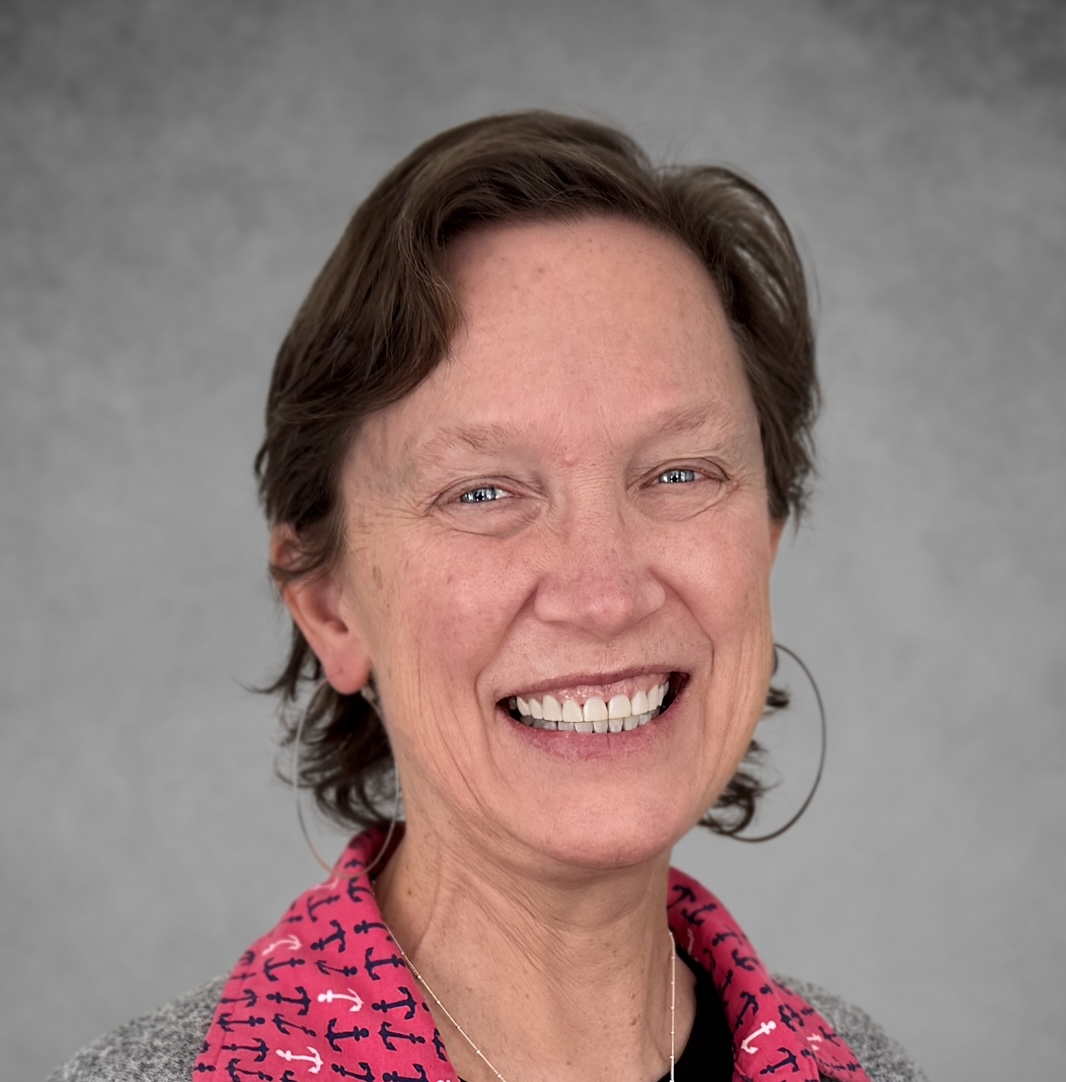
Carolyn Woodard is currently head of Marketing and Outreach at Community IT Innovators. She has served many roles at Community IT, from client to project manager to marketing. With over twenty years of experience in the nonprofit world, including as a nonprofit technology project manager and Director of IT at both large and small organizations, Carolyn knows the frustrations and delights of working with technology professionals, accidental techies, executives, and staff to deliver your organization’s mission and keep your IT infrastructure operating. She has a master’s degree in Nonprofit Management from Johns Hopkins University and received her undergraduate degree in English Literature from Williams College. She loved having this discussion about the important topic that is close to her heart – growing IT management capacity at nonprofits.

Johan Hammerstrom’s focus and expertise are in nonprofit IT leadership, governance practices, and nonprofit IT strategy. In addition to deep experience supporting hundreds of nonprofit clients for over 25 years, Johan has a technical background as a computer engineer and a strong servant-leadership style as the head of an employee-owned small service business. After advising and strategizing with nonprofit clients over the years, he has gained a wealth of insight into the budget and decision-making culture at nonprofits — a culture that enables creative IT management but can place constraints on strategies and implementation.
As CEO, Johan provides high-level direction and leadership in client partnerships. He also guides Community IT’s relationship to its Board and ESOP employee-owners. Johan is also instrumental in building a Community IT value of giving back to the sector by sharing resources and knowledge through free website materials, monthly webinars, and external speaking engagements.
Transcript
Carolyn Woodard: Welcome to the Community IT Innovators webinar on growing IT management capacity at nonprofits with Johan Hammerstrom, the CEO of Community IT.
This is a topic that’s a real passion of mine. I wrote a white paper about it, which is going to be published by TAG, the Technology Association of Grantmakers, next year. Johan has over 25 years of experience with nonprofits and their IT. And I’m really looking forward to this presentation and conversation about how IT leaders can leverage IT management capacity to accomplish their missions.
My name is Carolyn Woodard. I’m the outreach director for Community IT, and I’m the moderator today. And I’m very happy to hear from our expert, Johan.
Learning Objectives
But first I want to go over our learning objectives. Today we’re going to focus on these themes. So what does it mean for someone to own IT? And who can that be at your nonprofit? What does well-managed IT require? And how can you check where your organization stands? Why does building IT management capacity matter more for nonprofit resilience than buying more tools, devices, and licenses? And what can nonprofit leaders and funders do next to start closing this gap?
And now I’d like to let Johan introduce himself.
Johan Hammerstrom: Thank you so much, Carolyn. Thanks to everyone who’s joining us today for the webinar. And if you happen to be watching the recording after the fact, we’re glad that you’re joining us that way as well. As Carolyn said, my name is Johan Hammerstrom. I’m the CEO at Community IT. I’ve been working here for over 25 years. And I’ve been working with a lot of nonprofit organizations in that time.
And I think this session, this webinar, really represents our longstanding belief that for IT to really be effective at nonprofit organizations, it has to be managed well. And however much expertise I have in this topic, Carolyn brings an equal or greater amount of expertise, having managed IT at more than one nonprofit organization during her career. So we’re very excited to welcome her. We’re going to be sort of co-hosts and co-guests today, and I’m really looking forward to hearing her insights as well into this theme.
Carolyn Woodard: Thank you, Johan. Before we begin, if you’re not familiar with Community IT, I want to share a little bit more about us. We’re a 100% employee-owned managed services provider. We provide outsourced IT support and we work exclusively with nonprofit organizations. Our mission is to help nonprofits accomplish their missions through the effective use of technology. We’re big fans of what well-managed IT can do for your nonprofit. We serve nonprofits across the United States. We’ve been doing this for 25 years.
We are technology experts and are consistently given an MSP 501 recognition for being a top MSP, which is an honor we received again in 2026. And we believe we’re the only MSP on the list serving nonprofits exclusively.
I want to remind everyone that for these presentations, Community IT is vendor agnostic. So we only make recommendations to our clients and only based on their specific business needs. We try never to get a client into a product because we get an incentive or a benefit from that. We don’t get benefits from that.
But we do consider ourselves a best of breed IT provider. So it’s our job to know the landscape, the tools that are available, reputable, and widely used. And we make our recommendations on the basis of that for our clients based on their business needs, priorities, and budget.
And a little bit more about us. As I said, our mission is to create value for the nonprofit sector through well-managed IT. We also identify four key values as employee owners that define our company: trust, knowledge, service, and balance. We seek always to treat people with respect and fairness, to empower our staff, clients, and the sector to understand and use technology effectively, to be helpful with our talents, and we recognize that the health of our communities is vital to our well-being and that work is only a part of our lives. All right.

So now I’m going to start our first poll. And Johan, can you see that?
Johan Hammerstrom: Yes, I can. I know, I know. This is great. That’s so good to see.
Carolyn Woodard: So what is the answer?
Johan Hammerstrom: Oh, it’s 100% nonprofits.
Carolyn Woodard: So welcome.
Johan Hammerstrom: Welcome, everyone. Welcome.
Carolyn Woodard: I just don’t think we’ve ever had 100% before.
Johan Hammerstrom: No, I don’t think so either.
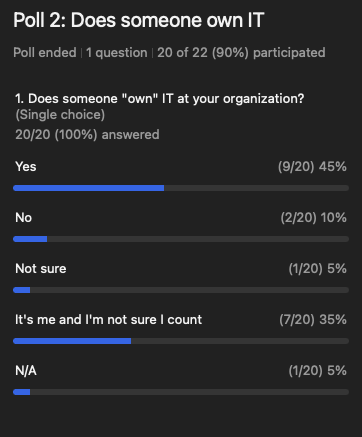
Carolyn Woodard: All right. I’m going to move on to our second poll of the day, which is: does someone own IT at your organization? So not just someone who fixes it, but plans, budgets, and makes the case for it. So it’s thinking about this strategically. Does someone own IT at your organization? And I’ll say at the outset, I usually say this in our polls, but there’s no shame involved here. So if you do not have someone at your organization who owns IT, go ahead and tell us. It’s not…
That’s mostly why we’re here today: to talk about this function and how we can make a case that this function is really important to a nonprofit being able to utilize IT to achieve your mission. Johan, can you see that?
Johan Hammerstrom: Yeah, just under half say that yes, someone does own IT at the organization. About a third say it’s me, but I’m not sure I count. And then there’s a handful of respondents for no or not sure. So mostly yes, just under 50%, and then a mix of no, not sure, and it’s me, and I’m not sure I count.
Carolyn Woodard: Yeah, that’s amazing. So thank you again, everyone who contributed to that. That’s super helpful to us as we go ahead with the presentation. So we’re going to jump in now.
What Well-Managed IT Looks Like
Carolyn Woodard: Johan, you have seen a lot of nonprofit IT, both successfully and less successfully managed at nonprofits. So could you talk a little bit about what makes well-managed IT?
Johan Hammerstrom: Yeah, thanks for asking. I think well-managed IT is a core concept for us at Community IT. We really think that, as I kind of alluded to earlier, in order for IT to be successful, it really needs to be well-managed. So we thought it would be helpful to just describe some of the characteristics of well-managed IT. And that’ll help you to think about whether or not the IT at your organization is being well managed or could be managed better.
And oftentimes when we talk to nonprofit organizations that are experiencing frustration with their IT, you can often trace it back to an absence of one of these characteristics or the absence of well-managed IT overall.
And if there’s kind of one theme that ties all these together, it might be proactive. And there’s this real divide in IT, in the world of IT, in your experience of IT, between proactive and reactive. Is IT always responding to things that are happening to the organization? Is it responding at the last minute to the needs that the organization has, or is it proactively anticipating what the organization needs and preparing and providing the IT services in a way that meets that anticipated need?
So some of the characteristics of well-managed IT are defined service levels. These include things like when IT service and support is available. Does the organization operate on a nine to five schedule Monday through Friday? Does the organization have staff that travel regularly and are in different time zones where they need to get to support? Or is the organization expected to work over the weekend?
So defining service hours, when service is available, is important. Defining response times and resolution times to IT issues and communicating those with the staff in the organization is also really critical to a well-managed IT infrastructure. So define service levels so that the expectations are clear, both for the staff in the organization, the leadership and management of the organization, as well as whoever is responsible for fixing IT problems when they occur and providing IT services. Make sure that everybody is on the same page.
Those can be very complicated for larger organizations, and they can be very simple for smaller organizations. So it’s not the complexity that is important there. It’s the fact that it’s defined, that it’s written down somewhere, and that that expectation is public and shared.
Predictive management is an important part of well-managed IT. And that includes ongoing monitoring of all the equipment and information systems that the organization uses. It ensures that if there’s a breach in the organization or a cybersecurity incident, that that is being identified early and addressed right away and not being allowed to linger.
Having the tools in place for proactively and predictively managing the IT infrastructure is an important part of well-managed IT. And it can include things like having an inventory of devices in the organization, knowing the age of those devices and when they need to be replaced, so that that can be included in the budget, not waiting until equipment breaks down.
Another characteristic or hallmark of well-managed IT is that the IT is being driven by the overall organizational strategy as well as the policies that the organization has, rather than the other way around. So one good example of that is for organizations who have staff that travel: what sorts of policies are in place for those staff in terms of how they access the internet, how they access organizational information?
Too often, organizations that don’t have IT as well managed as they would like will find themselves in situations where staff are asking for levels of access that maybe aren’t appropriate, but if there’s no policy in place for defining that, it creates a lot of uncertainty and can potentially lead to dangerous or insecure situations. So that’s important.
Automation, where appropriate, is another hallmark of well-managed IT. And this kind of ties in a little bit with the last one, meeting business needs. Automation is really helpful if you have well-defined business processes or workflows that are being repeated regularly by staff in the organization, and you can set those up in an automated way in your IT systems. Being able to do that effectively requires understanding what those business processes or workflows are, and then having a dialogue between the business owner of the process and whoever in IT is setting that process up.
Managing AI at Nonprofits: Part of the IT Management Picture
Carolyn Woodard: You know, I said this was going to be a webinar that wasn’t about AI.
Johan Hammerstrom: We promised we weren’t going to use those two letters together.
Carolyn Woodard: I know. But I just wanted to ask you quickly about this kind of narrative or framework right now that AI is so easy to implement and then it can just fix a lot of your IT problems because you have AI. Do you want to talk a little bit about our experience with that myth?
Johan Hammerstrom: Well, I think it reminds me a little… this sort of thing actually, if you’ve been in IT for a while, sort of repeats itself every 10 or 15 years, where there’s sort of a new capability for building things that gets unlocked.
Five or six years ago, there was this whole no-code or low-code movement among the big IT companies, Microsoft and others. And the idea was you can build your own software, not having to know any sort of coding language. We have the tools now, these no-code, low-code tools that enable you to build your own software.
I remember, 20, 25 years ago, Microsoft had a program called Microsoft Access. And they were like, this is great. You can now build your own database. You don’t need to be an expert in databases. And what happened was a lot of organizations would get an intern who was really proficient in Microsoft Access. They’d build a database for the organization, and then when their internship was over, they were gone. And the organization had started using these Access databases to track cases or constituent information, and then inevitably the database would break or the business would evolve and they’d need to make changes to the database, and they couldn’t because the person who built it was gone.
And there’s sort of a similar risk now with AI. If you entrust all of your information systems to these tools, yes, they might be easy and convenient for building the system initially, but what’s the long-term plan for maintaining that system? Who’s going to maintain it if the system breaks?
So I’m glad you raised that point, Carolyn, because automation is very powerful and it can be very convenient, but just setting up the automation… this is kind of an overarching theme for well-managed IT. Just deploying the tool or the solution isn’t enough. You really need to have a long-term plan for maintaining it and for managing it.
Carolyn Woodard: Yeah, you need to manage it. And I think that’s something that’s so deceptive about AI: it’s so easy. You just ask it a question, it’s a chatbot, it’ll answer, it’ll tell you what you need to know. And there’s so much change management, and there’s so much research and understanding the security involved and just owning AI as you deploy it at your nonprofit.
So I just wanted to call attention to that as well. If you’re not managing IT now, you’re not going to be able to manage AI very well either. And I think that’s something that we’re seeing going forward. So what does it mean to own IT?
What Does It Mean to Own IT?
Johan Hammerstrom: Yeah, so this is a question I wanted to ask you, Carolyn. In order for IT to be well managed, it really needs to be owned by somebody in the organization. And you have some experience with that in one of your previous positions as the IT director for a pretty large international nonprofit organization. Could you talk a little bit about, from your experience and what you’ve seen at other nonprofits, what does it mean to own IT?
Carolyn Woodard: Yeah, you’re taking me back. And I still have friends who tease me about this because, as you know, and I’m going to tell everyone on this webinar right now, I am not a technical person. I don’t know how to code, I don’t have a background in computer anything, basically. Computers are tools that I have used throughout my career.
But I think I’m also not afraid to try to understand what I need and to see the opportunities and not to just rest if something technical doesn’t work, like, oh well, there’s nothing we can do about it.
So I think owning IT for me is that it’s a function. You are a manager, and I had management experience, or I grew management experience, at the different nonprofits I had worked at before I landed at this international NGO.
And they had different systems. They had the right idea: they were trying to consolidate management of these very different systems in one department and then in one person, but it was very disparate.
So there was the CRM that they used, which was at the time Raiser’s Edge. They had an internal intranet. I don’t know if anybody on the call remembers those days, but a vendor had built this very fancy, very, very complicated internal kind of messaging board that very few people were using. And of course we had email, we had devices, we had an inventory, we had things that we had to do. There were, I think, nearly a hundred staff. So people had to be provisioned: when we hired someone, they had to have their device and their email, their login, everything that they needed to be able to do their job. So we also had a vendor for that, the IT people.
And then there was me at the top, making sure all of these pieces worked. And a little bit every day I would go crazy because something would happen over here, and I was trying to spend time understanding and managing something over there. So there was a lot of that firefighting and reactive work. I came into a situation where the person before me had been very reactive.
I think through that experience, I also learned and began to understand two things. One, as I said, we had a vendor that was an MSP, not Community IT, an MSP that had been with the organization for a while. And so they were relatively on top of the inventory, the devices, the acceptable use policy. And they were our help desk. So when something didn’t go right, we had them. They were on site.
But they were very limited in their ability. They knew all about the IT and they knew about that technology level. They could not do anything around budgeting, strategic planning, managing expectations, implementation of different systems that were on top of our IT systems, like the CRM. They knew nothing about Raiser’s Edge and they didn’t want to know anything about Raiser’s Edge.
So that vendor was not capable of playing a strategic role at that nonprofit. That was me. I had to understand… I had them doing the IT, but I had to do the strategy and the thinking and the budgeting and understanding policies and communicating with them and helping them communicate with our staff.
And then on the other side, up from me, I also came into this experience of our executive team. They wanted IT to work and they were very entrepreneurial about wanting a bright, shiny new system or a solution that was going to do some new thing that the CRM wasn’t doing or the intranet wasn’t able to do. Should we just get a new one?
But it was very difficult. I had to work a lot on translating what they wanted to the level of IT, because they were very hands-off on the actual IT. They had the kind of mindset of, I’m the CFO or the COO. I am not the IT person. So I’m going to describe for you this kind of pie in the sky, magical unicorn of what I want the IT solution to do. And I’m going to nickel and dime you on what you need in the budget to actually support it and the staff that you might need to actually support my idea of what I want to have happen.
And so I was constantly translating, telling the executives the good news and the bad news about what they wanted to be able to do and how much it was going to cost and what kind of staff support it was going to need.
And then also translating down from the executives to the other staff that I worked with and my team: well, we have this marching order, we want to do this, or we want to enable this kind of fundraising mailing to happen. Can we do that? And usually it was, like, next week. And I would be like, the system is just not set up to be able to turn that around like that.
And then the last thing I’ll say about describing these issues is that, because we were constantly fighting fires and unable to do the more strategic thinking, we really had a lot of legacy solutions that weren’t really working for the business needs that we had, but that were really, really hard to get out of because we had invested so much in them.
So even though it seemed like every couple of months there’d be some new bright idea of, oh, we’ll just replace this system, it really was not integrated into the way strategic decisions were made. And so that was a real liability at that executive level: it was very difficult to incorporate strategic thinking around IT, and the planning and change management that would go into it, into making those things happen.
So I guess to pull it back to what does it mean to own IT? You do need to have someone, and it might be someone like me. I was in this kind of middle management area. Someone who has the primary responsibility for it, who has the oversight over these different IT tools, the basic IT, the MSP level IT. Someone who has that strategic oversight and governance, being able to have policies and take action when those policies are broken, and make sure that everyone on staff knows what the policies are.
One that I struggled with was decision-making authority. So I could go to the executive team and tell them what I needed, but I did not myself have the ability to say, here’s what we’re going to do and here’s how we’re going to do it. And that is common at lots of different businesses, not just nonprofits.
And then yes, I was responsible for outsourcing vendors. We did not have a fractional CIO, although when I left that organization, that was one of the things that I put in place: to advocate for and hire someone who was at a CIO level who could solve some of that problem of the decision making that I was running into.
So that was a little bit long-winded, but I hope that shows everything about owning IT. So on the good side of that, I did own IT. There were some struggles that I had and some inadequacies there. But it shows that I did not have a technology background, but I managed the vendors, I managed the teams, and I managed up to the executive team that was above me that I reported to.
What a Healthy Nonprofit IT Environment Looks Like
Carolyn Woodard: So, Johan, I think we’re going to move on and talk about what a healthy nonprofit IT environment looks like. And this is part of the white paper.
You contributed a big section to the white paper about if you are at a nonprofit or if you’re at a funder and you’re thinking, I don’t even know what a healthy IT system looks like. Here is a list that you can work from. So could you talk a little bit about the capacity needs here on the left-hand side, those five areas?
Johan Hammerstrom: Yeah, this is kind of the money slide in some ways. And the idea was just providing a very simple framework for non-technical staff at nonprofit organizations to think about whether or not their IT is living up to its potential, providing all of the service that it should for the organization.
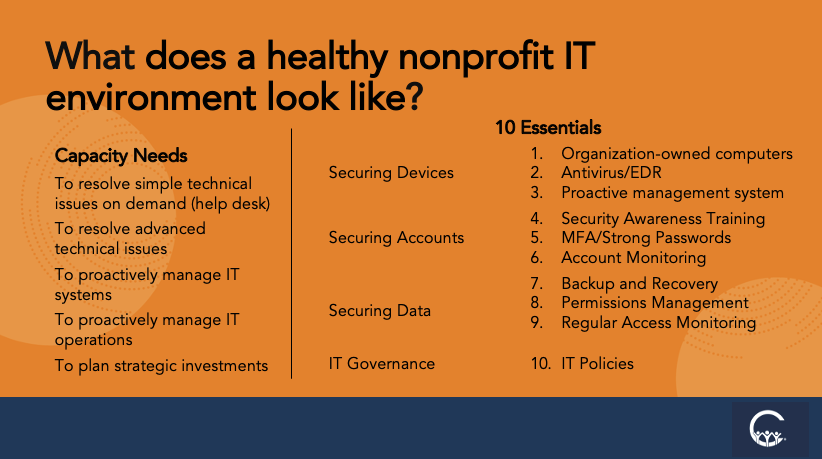
So on the left, you see these five capacities. So for each one of these, you can sort of ask the question: does our organization have the capacity to, or does the IT at our organization have the capacity to? And you should be able to answer yes to all of these. These should all be checkboxes.
So does the IT at my organization have the capacity to resolve simple issues on demand? Sometimes that’s performed by a help desk. Not always. Small organizations maybe have someone in-house that staff go to for getting simple technical issues resolved, but this is a critical capacity that is a hallmark of IT being well managed at an organization.
Number two, does my organization have the capacity to resolve advanced technical issues? The majority of technical issues should be relatively simple and they should be addressed pretty quickly, but there will be advanced technical issues that come up, regardless of the complexity of the environment that you’re operating in. It’s just the nature of IT. These are complex systems, something’s going to happen, the system might change, whatever the cause, and you need someone with advanced technical expertise to address it. Oftentimes, this will be outsourced for smaller organizations; much larger organizations might have an IT team in-house that has more advanced technical staff who can do that. So that’s the second.
The third, does my organization have the capacity to proactively manage IT systems? Is there a fully functioning antivirus solution deployed to all of my devices, to all of the endpoints that are being used by the organization? Is the organization proactively monitoring all of the logins into Google Workspace or Microsoft 365? These are all examples of ways that IT systems can be and should be proactively managed. So that’s an important capacity to have.
Number four, does my IT have the capacity to proactively manage IT operations? So that would be ongoing: for example, when somebody new joins the organization, is their account getting created in a timely manner? Is their laptop getting provisioned for them and delivered to them in a timely manner? Do they have IT orientation? That’s a very simple sort of operational requirement, but that’s something that should be proactively managed by the organization.
And then fifth and finally, does IT have the capacity to plan strategic investments? Is IT a stakeholder and a participant in the annual budgeting process? As the organization puts together its strategic plan for the year, is IT involved in that process? And do the strategic organizational plans include an IT component? So those are the five capacities.
And if your organization has one or two but not the other three, then that’s something to look into.
10 Essentials for Nonprofit IT Security
Carolyn Woodard: And then on the right-hand side of this chart, we have 10 essentials. And these are a little bit more technical. So if you have technical people in the audience, don’t worry. You already know all this. But if we have non-technical people in the audience, can you just go through, quickly, these 10 essentials of securing devices, securing accounts, securing data, and then IT governance?
Johan Hammerstrom: Yeah, and these are all very security-oriented. So in some ways, these are the 10 security essentials. And even if you’re technical, these can be effective for communicating to non-technical stakeholders in the organization, senior leadership, potentially even the board.
We think of the 10 security essentials in these four categories.
The first category is securing devices. Does everyone who’s accessing the organization’s information have an organization-owned computer? That’s pretty critical. Obviously, there are some exceptions to that. If you’re working with consultants, they may have their own computers that they’re using. But in those cases, you want to have very strict limitations on the level of access they have to the organization’s information.
Typically, staff in the organization have comprehensive access to the organization’s information. That should only be happening from computers that are owned and managed by the organization. That’s number one.
Number two, make sure that antivirus software, anti-malware, and endpoint detection and response software is installed.
And number three, that there are proactive cybersecurity systems for monitoring activity on all of the laptops as well as activity on the cloud systems. So that’s how you secure your devices.
The second category is securing your accounts. The number one way you can secure your accounts is by training your staff, providing security awareness training. The number one method by which hackers gain access to systems now is through phishing attacks. And so if you can train your staff to detect and report, but not succumb to, phishing attacks, it goes a long way towards securing the organization.
Number five, implementing multi-factor authentication and ensuring the use of strong passwords.
And number six, this is kind of an analog of number three: monitoring account activity on your cloud hosted systems.
And then finally, you want to secure your data by backing it up and testing recovery. Make sure you have a good recovery process.
Number eight, having a good permissions management framework in place, a good structure for who has access to what, and a good system for defining who can grant access to different levels of information.
Number nine, regularly monitoring access to information in cases where sensitive information is being stored, potentially setting up a data loss protection system.
And then finally, number 10, having good IT policies. These will be pretty simple and straightforward for smaller organizations, and could end up being much more complex for larger organizations. But IT policies are sort of the starting point for good IT governance.
Carolyn Woodard: And that’s something that I feel like we see a lot, at least with prospects that come to us and don’t have an acceptable use policy. And that is something that can feel like you can put it off: oh, we’ll write that policy at some point. We have to solve the MFA problem right now.
But definitely that IT policy… you can’t hold your staff accountable for misusing something if there is no policy. You just can’t hold them accountable for that.
And then I would say also that there are templates out there for writing that acceptable use policy, but that really is just such a bedrock. And it should be part of your employee handbook in your first days on the job, but it’s also something to refer back to.
And especially now in the days of AI, if you have an acceptable use policy, but it doesn’t include anything about how your organization has agreed to use AI, then you’re missing this huge chunk as well. So make sure it’s a living document and not just something that somebody wrote back in the day that you hand out to new staff and then forget about. Thank you so much.
I feel like this slide, as we said, is so useful and helpful to someone in IT who is thinking about what are the things that we need to have, or the level that we need to get to, as a start, as a foundation.
So now I want to shift gears a little bit. And I want you to put something in the chat. If you’re thinking about this, put this in the chat. This is all anonymous; we’re not going to share this out. But what’s one thing that would change at your organization if someone truly owned IT strategy and IT management? So go ahead and think about that. It doesn’t have to be an essay, maybe a couple of sentences, and put it in the chat as we continue talking. And if we have some good answers, we’ll come back to it in the Q&A and talk some more about some of the things that can change.
So just a way to get you started thinking about how your IT management is something you have the capacity to grow. So I want to try to make this a positive thing. To the person who put the question in the Q&A chat, that’s a fantastic question. We will answer that in the Q&A at the end of the presentation.
And so moving on, I want to talk a little bit about the white paper and about internal IT capacity as an opportunity.
Why IT Management Capacity Is an Opportunity
Johan Hammerstrom: Yeah, thank you, Carolyn. It was your inspiration to work with TAG on putting together this white paper. And I was wondering if you could share a little bit about what was on your mind, what sort of inspired you to make this white paper happen, why you think it’s important, and maybe start with what the white paper is about?
Carolyn Woodard: Yeah, so the white paper started… I’ve thought about this for years now. I described for you earlier my experience as an IT director and a lot of the kind of philosophical, essential questions about my role at that organization and the many challenges that I faced.
But I really wanted to write this white paper because I feel like this issue gets framed a lot around deficit and challenges. And since I’ve been in nonprofits and working in IT and nonprofits, it’s kind of always framed around why doesn’t it work? Why doesn’t it work better? Why is IT such a challenge for nonprofits?
And so one of the things I wanted to think about in writing this paper was to use asset framing instead. So to start from a positive point, a point of assets: what do the different players in IT at nonprofits, these different actors, bring to the table that are assets? And that capacity itself is an asset that you can grow.
And one of the things I think that we really don’t think about enough in the nonprofit sector when we frame it as a deficit, as a challenge that we have to fix, is that, in my experience working both for for-profits and for nonprofits, nonprofit staff have really an amazing knowledge of what their organization does and how it does it, and what their job is and how they do it.
And I don’t know, for the people in the audience who work at nonprofits, the last time you worked for a for-profit, but it’s very common to find someone who really only understands maybe their little piece of what the company does, or they may not even understand that. They just do the things that they’re supposed to do.
So in all of the nonprofits that I’ve interacted with over the many years, there’s a really deep knowledge, like I said, of what the nonprofit does. And that is kind of a killer app in a lot of ways. If you’re an IT person or a funder coming in to work with a nonprofit, that is knowledge that you really need to work with, because those staff know what they want to be able to do. And so starting from that standpoint of what could the technology allow them to do, if they could do what they wanted to be able to do, I think is really important to come into this argument.
And then you have your IT vendors, of course. So MSPs like we are, and consultants, management consultants, change management consultants, have a lot of expertise and understanding of, as I said at the outset, what the landscape is: what tools are out there, what companies are reputable and are going to be around 20 years from now and still able to provide that tech stack.
So that nonprofits are in a position where, when they’re using a technology that a lot of organizations and for-profit businesses are using, there are a lot more consultants out there who can help them with it. We want to get away from… like you and I know, Johan, 20 years ago, there were a lot of custom-built solutions, and it just locks you into, like you said, the one person who knows how the Access database works. And then they can charge you anything, really. You don’t have other options where you can go to find someone else who can help you with this problem.
So I think the IT vendors bring so much. They have all of this IT knowledge, but they don’t have the deep understanding of what the nonprofit does and what their business needs are and what the technology needs to help enable.
And then for funders, they’re interested in this great grantee, they want to enable them to do their mission more, whether it is reaching kids after school or saving a whale, or all the many, many things that nonprofits do in the different sectors where they work.
And so these funders are coming in with that capacity-building funding that is going to enable the nonprofit to do its thing. So they have a lot of understanding, maybe across their grantees who work in education, of what works.
But they aren’t thinking about the IT. And they aren’t thinking about the ways that the IT could be part of the solution.
So that’s where I started out with this white paper. And I wanted to originally do just a landscape of what are funders doing in this space that is working. What are the models that are out there? And yeah, there are very few. I’ll put that out at the outset.
There are some amazing funders who are doing really amazing things. Kauffman Foundation in Kansas City is one of the ones to look to, where their operating funds say explicitly when you apply for that funding that IT support is a part of operations and that you should be putting in your application what you need for your IT to work effectively. And so even just naming that is really important from the funder’s standpoint.
And there are several other good examples and models, but I was really surprised. Well, I guess I wasn’t really surprised. The fact that this challenge has persisted over so many years really speaks to the fact that funders are not looking at this as an opportunity, or not looking at this as something where they understand what they can do.
And so that was another big impetus for me to write this white paper: to try and uncover some of those models that are working and get people talking more about experimenting and seeing what works, and talking openly about IT needs at a nonprofit when they’re talking with their funder, when they’re talking with the vendors.
And so for all of these actors to kind of come together and bring their assets to the table to work on this project.
Some of the things that come out in the white paper that I talk about is that funding the technology without also funding IT management capacity building is one of the things that has led to the technical debt that nonprofits find themselves in, and strategic challenges in mission delivery.
So one of the arguments in the white paper is that this lever of increasing the ability of the nonprofit to manage IT is something that is going to make their mission more impactful. So they’re not spending a lot of their time doing workarounds, worrying about their IT, trying to get an answer from the help desk for something that’s not working, that’s keeping them from working because their laptop won’t open or won’t open the program that they need. They’re spending all of that time on that instead of spending the time on their mission delivery. That is why they’re there in the first place and why the funder is working with them in the first place.
So that’s one of the arguments that comes out of that: IT management capacity is going to make more impactful nonprofits.
Along those lines as well, another aspect that the white paper talks about is this shared responsibility and shared partnership, which really built on a lot of my experience at Community IT.
So when we work with our clients, we really consider ourselves partners in the technology that they want to be able to use to do their mission, and in that well-managed IT. And so correct me if I’m wrong, Johan, but it’s very difficult for us if we are working with a client who really wants us to do all the IT for them and then present it to them: well, here’s how your IT works. Because they’re keeping from us, as I said, that deep knowledge of what they’re trying to do and what their constraints are and what their staff deal with day to day. So it’s really, really difficult as an MSP to work in that environment where you’re not partnering with the organization.
And so from that understanding of how a good IT partnership can work, I really thought a lot about that when I was thinking about these three or four or five pieces, the different actors that work around IT at nonprofits.
The paper talks about, and I’m sure people in the audience know this, how we’ve moved from 20, 25 years ago, when there was this myth of keeping the overhead as low as possible, to moving now into more trust-based philanthropy, which is this exciting new area that has been working really well for funders who can have that kind of relationship, and to even newer ideas around total cost budgeting.
So the idea is that for decades, nonprofits have gone to funders and donors with the least of what they need to function, and if they took a better account of everything that goes into being able to deliver their mission, it would be a larger budget, basically. A lot of people at nonprofits are not paid an equitable salary. They don’t take into account total cost of ownership, like for devices, for change management, for new tools. So we’re trying to move into a better accounting for what it costs to have functioning IT.
There’s the idea that IT management capacity is an equity issue. So we’re asking our nonprofit staff and founders, these amazing community organizers, environmental activists, whatever sector they’re working in… we’re finding these amazing people who have started these amazing organizations, who are doing these amazing things. I mean, that’s why we’re all working in nonprofits, in the philanthropy sector.
And then to also expect them to be an expert in IT when that’s not their core lived experience of what they’re bringing to the table, it just is really unfair. So making this sector better able to recognize that and provide the supports for the IT itself, but also for growing that ability to manage IT, I think is really important.
As I said, the delivery models and examples do exist. We’re trying to surface them and have more examples that funders can look to when they’re thinking, oh, I need to actually help grow this management capacity. How do I do that?
And then in the paper, one of the next steps that comes up is, as I said, this is an unrealized opportunity. In our experience, in our 25 years of doing this, the person who owns IT is so important. Investing in the ability of the nonprofit to have that person who owns IT really be able to do what they need to do is just going to be very impactful. So we’re trying to argue for that for the funders.
And then for nonprofits, there’s the ability to grow that capacity. It could be an internal person, it could be partnering with an MSP. There are lots of resources out there. But I think it’s been kind of disguised a little bit as “you need the right IT.” And we want to try and reframe that a bit as “you need the right IT management.” The IT itself can fall into place, but without management, it’s really difficult to have your nonprofit reach its goals. So that was a bit long-winded.
Johan Hammerstrom: No, it’s great. That was great.
Key Takeaways: Growing IT Management Capacity at Nonprofits
Carolyn Woodard: Here are some key takeaways from today.
As you think about this, and if you share this presentation (the video will be on our website), here are some things to think about that we’ve talked about over the course of this presentation.
The tools, devices, and licenses are the least of what you need, and they can’t be impactful without management capacity and that strategic thinking.
That management capacity can be grown, and there are lots of ways to do that that are in the paper, and we’ll talk about more of them in future webinars as well.
This moment of AI adoption is showing underlying IT management issues. AI cannot deliver well-managed IT on its own.
Funders, if you’re listening, have an opportunity, and the models do exist.
And like I said, all of the partners bring capacity and knowledge to the table. The key is going to be working together to make a change and face this challenge.
Q&A
So I think now we can get into the Q&A. I want to make sure we get to this question that is in the Q&A. If you have more questions, you’re in the audience, go ahead and put them in. Like I said, we’ll be able to answer some of them on Reddit also.
But here’s the question: I wear too many hats at my nonprofit, and I worry that I over-rely on our tech vendor to tell us what best actions are because I lack the bandwidth to think strategically. Ideally, I’d like to be able to think through these strategic questions, but in the meantime, is there one thing you would recommend to a one-person team who would like to be more proactive, but just can’t all the time?
Johan Hammerstrom: Yeah, it’s a fantastic question. And there are kind of two parts to the answer.
The first part would be, if you’re working with a third-party vendor who’s providing a lot of your tech support, require them to be proactive. So you can delegate, in some ways, the proactivity to them. If they’re not capable of being proactive, then that kind of tells you something about how much of a partner they’re going to be able to be for you in this situation.
But one of the ways that you can be proactive with your vendor is to have a monthly meeting, a monthly check-in. You may already have this, but that goes a long way towards being proactive.
Ask that they come to the meeting with a summary of what’s happened in the IT environment: a summary of how many issues they’ve worked on over the course of the month, a summary of the antivirus activity if there’s been any, a summary of issues that they’ve been working on. So just having that monthly check-in with your vendor will really go a long way towards shifting the relationship to being a more proactive one. So I would strongly encourage that.
I would also ask them to do an annual assessment. So every year, preferably maybe a month or two before you start putting your budget together for the following fiscal year, have them just do an assessment. And that should be something that’s very easy for them to do. They can make recommendations about things they’re seeing in the IT environment that maybe need to be changed or invested in. But require your vendor to be proactive and provide you with that information. So that’s kind of the first half of the answer.
The second half may be asking whether or not you should trust your IT vendor and the things that they’re recommending. And that’s a more difficult question. And ultimately, you need to get to a point where you can trust your IT vendor.
And if you have concerns that they’re selling you instead of making recommendations, if you have concerns that they’re not really capable of thinking proactively, one way of addressing that would be to get a third party to come in and do a mini assessment. Just get another IT support provider to come in and offer you a second opinion, basically, on what your current vendor is recommending or suggesting.
So those would be some ways that hopefully wouldn’t be too time consuming, that would help you to be more proactive with your existing vendor.
Carolyn Woodard: And the assessment… that’s one of the things I talk about in the white paper: funders like to fund “things,” like this many laptops or this many licenses, or we sent you to a retreat, that sort of thing. So an assessment is a thing. So it can be an easier ask to go to your funders or donors and say, we’d really like to just get a baseline of how our IT is doing and how we can be proactive about it.
And the other thing I was going to say about having that monthly meeting, which I know has come up with our clients, is that it can also help you see what’s going on. So if you have the help desk and they report to you what the incidents were, and 80% of them are one laptop, maybe that laptop is the one that you need to replace first. Or if it’s phishing issues and there’s one person that’s always clicking on everything, get that person some more training.
Those are going to be ways that you can take advantage of that monthly meeting yourself as well with your staff. So it is really hard to be the one-person department, and we really appreciate you and everything that you’re doing. So I want to move on. We’re going to answer some more questions on Reddit, but thank you again. That was just a fantastic question.
I think we did a really good job of hitting our learning objectives today. So, what does it mean for someone to own IT? You can think about who that can be at your organization. What does well-managed IT require? We have that great slide you can go back to and see. Why does building IT management capacity matter more for nonprofit resilience than buying those tools and licenses and devices? And what can nonprofit leaders and funders do next to start closing the gap?
I want to be sure to invite you back next month for our next webinar, which will be with our CTO and cybersecurity expert, Matt Eshleman. We’re going to re-release our revised Cybersecurity Playbook for Nonprofits that includes updates about AI: how it can create increased risks and how to manage those risks, whether you’re starting out, want to be better prepared, have been working in cybersecurity for a while, or have been working with AI for a while. So we’re going to answer a bunch of those questions.
And this year we created a new download specifically for organizations that are starting out and want to get to that foundational level of cybersecurity. I’m going to share that in the chat. And it’s also on our website at communityit.com, so you can check that out as well.
If you want to register for the next webinar, it’s 3 p.m. Eastern, noon Pacific on Wednesday, October 21st. And you can register at our site right now, communityit.com, and I will share that in the chat as well.
I want to thank you, Johan, for joining us today. This was a fantastic conversation. I really appreciate your time, and all of your contributions to the white paper as well. That will be coming out early next year. I’m leading a session at the TAG Conference in Chicago in November. So you can look that up on their website, tagtech.org, for the 2026 conference.
And Johan, just thank you again so much for joining us today.
Johan Hammerstrom: Thank you. It was a pleasure.
Carolyn Woodard: And thank you to everyone in the audience. I really appreciate the hour that you spent with us. I hope this has been useful to you as well. As always, get in touch with us with any questions that you have. We’ll be over on Reddit for a little bit, so you can join us there. And just thank you again so much.
As advocates for using technology to work smarter, we’re practicing what we recommend. This transcript was drafted with the assistance of AI, and is not a verbatim transcript. The content was edited for clarity, and was reviewed, edited, and finalized by a human editor to ensure accuracy and relevance.
Photo by Christina @ wocintechchat.com M on Unsplash