
AI in Project Management at Nonprofits
Listen to Podcast
Like podcasts? Find our full archive here or anywhere you listen to podcasts: search Community IT Innovators Nonprofit Technology Topics on Apple, Spotify, Google, Stitcher, Pandora, and more. Or ask your smart speaker.
The Role of AI in Project Management and Project Managers in AI Implementation
As a project management shop, Alex Tuck and his team at Tuck Consulting Group have found themselves learning a lot about AI implementations. Because project managers facilitate work across departments, they are often the ones navigating the trial and error of these new tools.
In this conversation, Alex and Carolyn discuss the ethical frameworks and practical prompting techniques that nonprofits can use to leverage AI without compromising data security or person-centered missions.
The conversation covers practical insights for nonprofits navigating the AI landscape, including:
- AI ethics and the human in the loop emerging as non-negotiable for accuracy and transparency.
- The theoretical potential of AI in the workplace detailed in the Anthropic report “Labor market impacts of AI: A new measure and early evidence.” Up to 85% of traditional project management tasks could be automated, while the need for human facilitators remains.
- Four key pillars for an ethical AI framework: prioritizing human well-being, maintaining transparency, ensuring data security, and keeping a human in the loop.
- Practical strategies for mastering the art of prompting, including defining roles, setting constraints, and using prompt libraries to scale organizational knowledge.
Resources Mentioned:
- Anthropic report on job vulnerabilities and theoretical exposure to AI replacement https://www.anthropic.com/research/labor-market-impacts
- Project Management Institute (PMI) CPMAI Framework: A comprehensive framework designed for managing AI-related projects. https://www.pmi.org/learning/ai-in-project-management
Presenters

Alex Tuck is Managing Principal of Tuck Consulting Group. “We help nonprofits and small businesses achieve their missions through expert project management. We coach, train, execute, and implement best practices in project management.
We are a team of 60+ PM consultants distributed across the U.S., supporting over 125 projects per year across the globe. We are changing the face of management consulting. We strive for equity and inclusion, while celebrating diversity of thought, background, and experience.
We have a pro bono practice that offers free PM services to nonprofits with need. Tuck is a Ruby-Tier ClickUp Implementor (Top 5 in North America), HubSpot Solutions Partner, and a Legacy Microsoft Silver Partner for Project & Portfolio Management. Our core clients & industries include: – Non-Profit – Healthcare – IT Professional Services – Digital Product (SaaS)”
Alex was happy to share his experiences and thoughts on AI and Nonprofit Project Management.

Carolyn Woodard is currently head of Marketing and Outreach at Community IT Innovators. She has served many roles at Community IT, from client to project manager to marketing. With over twenty years of experience in the nonprofit world, including as a nonprofit technology project manager and Director of IT at both large and small organizations, Carolyn knows the frustrations and delights of working with technology professionals, accidental techies, executives, and staff to deliver your organization’s mission and keep your IT infrastructure operating. She has a master’s degree in Nonprofit Management from Johns Hopkins University and received her undergraduate degree in English Literature from Williams College.
She was happy to have this podcast conversation with Alex about AI and nonprofit project management and AI adoption and implementation at nonprofits.
Ready to get strategic about your IT?
Community IT has been serving nonprofits exclusively for twenty-five years. In fact, we celebrate 25 years of Community IT this month and all year. We offer Managed IT support services for nonprofits that want to outsource all or part of their IT support and hosted services. For a fixed monthly fee, we provide unlimited remote and on-site help desk support, proactive network management, and ongoing IT planning from a dedicated team of experts in nonprofit-focused IT. And our clients benefit from our IT Business Managers team who will work with you to plan your IT investments and technology roadmap if you don’t have an in-house IT Director.
Being 100% employee-owned is important to us and our clients. It is an important aspect of our culture as a business serving nonprofits exclusively for 25 years. Unlike most MSPs, Community IT considers budgeting and strategic management a major part of our services to our clients.
We constantly research and evaluate new technology to ensure that you get cutting-edge solutions that are tailored to your organization, using standard industry tech tools that don’t lock you into a single vendor or consultant. And we don’t treat any aspect of nonprofit IT as if it is too complicated for you to understand.
We think your IT vendor should be able to explain everything without jargon or lingo. If you can’t understand your IT management strategy to your own satisfaction, keep asking your questions until you find an outsourced IT provider who will partner with you for well-managed IT.
More on our Managed Services here. More resources on Cybersecurity here.
If you’re ready to gain peace of mind about your IT support, let’s talk.
Transcript
Introduction to AI in Project Management
Carolyn Woodard: I’m going to turn recording on because we might say something cool, and then I’ll forget and be like, “Wait, can you say that exactly the same?”
Welcome everyone to the Community IT Innovators Technology Topics podcast. I’m Carolyn Woodard, your host, and today I’m really excited to welcome a friend to the podcast. Alex, would you like to introduce yourself?
Alex Tuck: Yeah, sure. Thanks for having me, Carolyn. My name is Alex Tuck, and I am the founder and managing principal of Tuck Consulting Group—the most creative name on the planet. We are a team of about 60 project managers, all US-based, mostly working with clients in North America, but we do work with folks all around the world.
We specialize in project management in four main verticals, though sometimes we do stray outside of them: healthcare, nonprofit, professional services, and digital SaaS. That’s really where we have a deep bench of experts. But when it comes to project management, it can be applied across all industries, so sometimes we do stray outside of that. I’m really excited to be here with you to chat.
Carolyn Woodard: Thank you for joining me. I know we’re going to talk a little bit about AI, which—is there any other podcast topic right now? But it is just something that I was interested to have you on for because I think you have some different things to say about AI, particularly with nonprofits.
You gave a presentation recently, and I just wanted to walk through that and ask you some questions about it to get your perspective on what you’re seeing from your nonprofit clients and what’s going on in the nonprofit and AI ecosystem right now.
The Role of AI in Project Management and Project Managers in AI Implementation
Alex Tuck: It’s really interesting because we’re a project management shop, right? So, what the heck are we doing talking about AI? What we’ve found is that project managers are in this sweet spot where we are leading AI projects everywhere—not just in nonprofit, but everywhere. We’re seeing how folks are doing it right and doing it wrong.
I swear to you, if anyone tells you that they are a straight-up AI expert, they are lying because it changes every day. Now we’re seeing that AI might be intentionally lying to us; there’s all this stuff happening. It’s really about how to have the trial and error and fail as quickly as possible.
Just being in the project management space, we’re seeing where PMI is rolling out the CPMAI framework, which is very heavy, but still takes you through the AI framework for projects. Then we’re seeing these really lightweight implementations. It’s really fun to see how all of that’s happening. Especially for nonprofits—I founded and run a nonprofit too—I know that we’re all so cash-strapped and resource-strapped that we have to figure out how to be lean, adopt AI, and still do our actual program work. That’s why we came up with this content for the presentation we did for some nonprofits.
Carolyn Woodard: I want to push back a little bit because it’s interesting for you to say, “What would we know about AI?” Of many things that people have started trying to use AI for, I think project management is one of the clear winners. There are clear tasks for AI to help you with in project management. Of course it would be impacting how you’re doing what you’re doing and how your clients are doing what they’re doing.
Alex Tuck: It’s so interesting. I don’t know if you saw the Anthropic report about the impact on employment. If you look at where I think about project management, it falls into two categories. For listeners out there, Figure 2 in that report is really interesting because it shows a graph about the potential for overtaking jobs in a particular area versus the actual overtaking of jobs. They overlay those two.
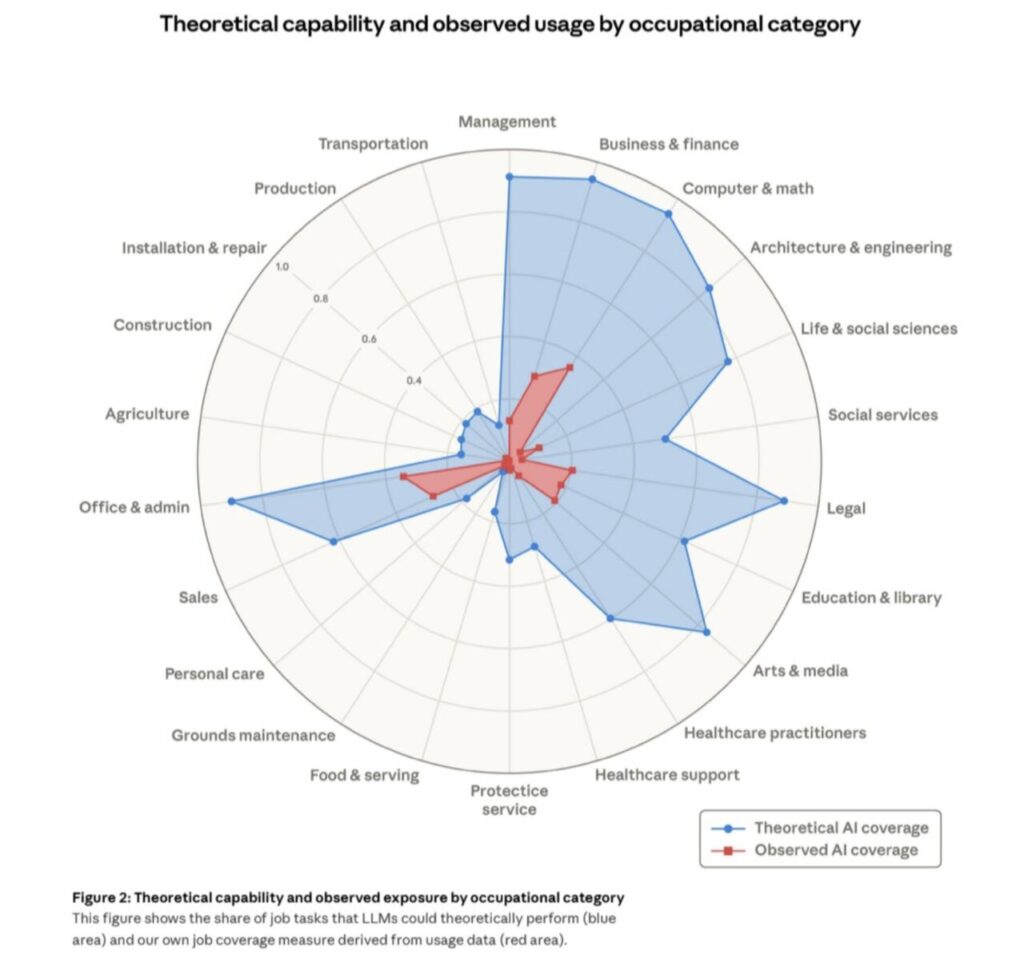
There are two areas: one is office work and administration, and one is management. When you look at it, something like 90% or 95% of all office, admin, and management tasks have the potential to go away with AI theoretically. They call it the “theoretical potential.” But the actual penetration in office and admin is like 10% to 20% so far, and management is like 5%. Everyone knows why management has not been taken out yet.
In project management, we estimate at our company that approximately 85% of all project management tasks that we did two years ago are going to be completely replaced with AI. I don’t think the term “project manager” is going to exist exactly like that in the future, but there are still people that need to facilitate conversations and get work done. When you have cross-departmental activities, you can’t have a functional manager manage a project because the CFO is not necessarily going to agree with the CIO or the Executive Director. You need that person that’s going to play the facilitator across those groups. We think that we’re going to be there for a while. Getting AI to give you an output that you expect every single time is also an impossible challenge.
The Human in the Loop and Healthcare Workflows
Carolyn Woodard: We’ve been seeing that with our clients as well—having that human in the loop. The more we do it, the more we’re realizing that is non-negotiable. You cannot just take the output and share it widely without having looked at it.
Alex Tuck: It’s so interesting. Healthcare nonprofits especially are battling this. Where do you put a human in the loop? Because of the laws we have in America, even though a physician can be part of an entire AI build-out, there are still hurdles.
There is a big hospital system in the Northeast that built an oncology workflow. An average oncologist typically spends between 30 minutes to two hours prepping for a call, reviewing charts and all that work, which is insane. Most physicians spend zero; they literally look at the chart as they’re walking in the door. But oncologists have to spend all that pre-work time.
This hospital system spent two years building an AI workflow to read all that data, provide a summary, link back to biomarkers, perform ambient listening, and then do the output. It’s more accurate than the humans—literally more accurate by about 2%. It has a 99.6% accuracy rate, but they still can’t push the green button to deploy it because they need it to be closer to 100%. They need it to be nearly perfect. That brings up the point: when does the human need to be in the loop? It’s a very fascinating challenge to figure out how accurate we need to be.
Ethical Frameworks for AI Adoption
Carolyn Woodard: That falls under ethical questions and considerations. Are there other tips or trends that you’re seeing around ethics for adopting AI?
Alex Tuck: There are a bunch of different ways that you can think about AI ethics, from environmental impact to other things. But there are four areas where we think if you have these in mind, it will help you in whatever you roll out:
- Human Well-being: It should always be focused on helping enhance human well-being. It shouldn’t just be about how to eliminate jobs and make more money. It’s about how to make our workforce, our clients, or our patients have better service or better well-being.
- Human in the Loop: We already mentioned that.
- Transparency: This is really important. We need to be transparent about how we’re using AI and when we’re using AI. If we did that more, it would help people understand whether they can trust it. It’s so easy to get disinformation. We’re trying to figure out where to place that on our website so people know we might be using AI to do research on certain pieces of content.
- Data Security and Privacy: The US hasn’t really figured this out yet from a legal perspective. In the absence of that, how do we as a company or a nonprofit make sure that when we’re putting stuff into ChatGPT, we aren’t using a free version where donor data feeds the model? Do we need to have things air-gapped or protected so that client data and PHI are not being put out onto the internet?
Carolyn Woodard: We’ve had a lot of clients asking about that data “leakiness.” Which vendors are they using? What are the terms and conditions? For a lot of nonprofits that have been coasting along with “okay” cybersecurity, we are getting inquiries and anxiety around whether they have enough protection. If they are working on an advocacy area, there may be external actors who would really like to get their donor list, and AI makes it very easy to find what you need in that data. It’s prompting people to think a lot more about security, which is good.
Alex Tuck: People are super skeptical. I am married to a Luddite; she absolutely hates technology, but she brings up great points. My kids—they are four to ten years old—love to ask Google questions. She asks them, “Have you guys thought about asking yourself what you think the answer is first?” That’s such a smart thing to do.
Having people that are distrusting and asking these questions is helpful. You saw that Stryker went down because their Microsoft environment got hacked. These humongous companies have almost everything in place, and Intune was their vulnerability.
It all comes down to governance—making sure you have a set of individuals making sure everyone is educated and understands how technology is being used and how you’re protecting internal data. In nonprofits, we expect people to do 60 hours worth of work in 40 hours, and there’s a math problem with that. The only way you can do that is through AI. We have to give our folks the tools to be able to achieve their work quicker.
Carolyn Woodard: A lot of for-profits will look at AI and think, “I can fire five people because one person can do five people’s jobs.” From the nonprofit side, we already have one person doing five people’s jobs. Now, maybe they could have an AI assistant that helps them do three people’s jobs better so they can actually spend their time on the last two jobs they really need to do to move the nonprofit forward. Hopefully, we’ll see some productivity gains to help people who are stressed out.
Mastering the Art of Prompting
Carolyn Woodard: I wanted to ask you about the mechanics of using AI. One of the things you mentioned previously was prompting. You have to learn the language of what to put in the prompt to get better output so you don’t have to reprompt over and over. What do you advise on how to learn to prompt better?
Alex Tuck: Because we are a project management shop, we have the luxury of sitting in the co-passenger seat. We’re helping guide based on what we’re seeing on the screen.
The decisions come down to what business challenge an organization is trying to solve. From there, you figure out the tools and then the prompting.
We are a ClickUp shop, and they have built-in AI. For us, prompting might look a little different than someone just using ChatGPT. But there are some universal elements that will give you a result you actually want:
- Provide Context and Instructions: Start by telling the agent or the GPT, “You are going to act like X type of role, and you are going to do this task.”
- Define Constraints: Set the rules for what it can and cannot do.
- Provide Standards and Sources: If you want it to use APA instead of MLA, tell it that. Link to your style guide or specific sources you care about.
- Structure the Output: You can give it the specific output structure you want, or even use code to show it more clearly.
I have an agent right now that tells me how well I did on a sales call by feeding in the transcript. It’s applicable to nonprofits for donor calls, too. It tells me the probability of closing the deal, what follow-up activities I should do, and gives feedback on how I can improve based on sentiment. It’s really accurate.
When you get into the agent space, you can put in much more context. If you’re just going straight into ChatGPT, I like a lightweight approach: giving it context, the task, and the resources. I also like to ask the agents to ask me questions. “What are my gaps? What am I missing with my prompt to you?” I find that to be very helpful.
Carolyn Woodard: It’s such a change. It’s not obvious from just having a little field and putting in a question, but context makes that output so much better.
Alex Tuck: I’ve heard people use the analogy of AltaVista and Google. We were all horrible at searching at first. Once you figure out that you can use Boolean, quotations, and other techniques, you get actually what you want. It’s the same thing with using AI. Once you go further into using chained agents where they talk to each other and trigger things—that looks like magic to people. It still feels like magic to me sometimes.
When to Iterate and When to Quit
Carolyn Woodard: Sometimes you prompt and reprompt and it takes a lot of time. How can you add to your prompt after you’ve gotten an answer back that isn’t quite what you want?
Alex Tuck: I like to bucket things into two types of prompts.
One is a prompt for a unique thing you’re only going to do once.
The second is a prompt you may reuse because it’s part of your business workflow.
For the second bucket, I love prompt libraries. You can build your learnings into those prompts—Step 1: do this and give this context; Step 2: take it in this direction. Then you and other people can use those in the future.
For the one-time research project, those are more fun. You might start down a path and see hallucinations, and at that point, you just wipe it away and restart. I’ll just go and delete that out and have it forget that the conversation ever existed.
Carolyn Woodard: Sometimes people just give up, especially if it’s the end of the day. But it’s important to encourage people to maybe come back and tackle the problem a different way rather than deciding the AI isn’t useful at all.
Alex Tuck: We do that a lot at my company—just asking someone else, “I’m trying to do this thing, what am I doing wrong? Why am I not getting the output I expect?” Having another set of eyes helps so much.
Also, I love quitting projects—but I love quitting them really early in the process. We might try to build an agent or a prompt library for a use case, try it seven different ways, and spend half a day on it. The goal is to spend an hour, not a whole day, on a hypothesis. If it doesn’t solve it, it’s okay to let it go. The best time to quit a project is before it starts, but the second best time is really early.
Carolyn Woodard: It’s better to have spent half a day than a month. Alex, thank you so much for sharing all these insights with us. It was delightful to talk with you. I hope we can have you back to talk more about what you’re seeing with your nonprofit clients.
Alex Tuck: Thanks so much for having me. I love your show and I’m excited to finally be a part of it.
As advocates for using technology to work smarter, we’re practicing what we recommend. This transcript was drafted with the assistance of AI, and is not a verbatim transcript. The content was edited for clarity, and was reviewed, edited, and finalized by a human editor to ensure accuracy and relevance.
Photo by Vitaly Gariev on Unsplash