View Video
Subscribe to our Youtube Channel here
Listen to Podcast
Part 1 covers how AI is changing the threats nonprofits face and why policy, training, tools, and compliance still matter more than expensive tools. Part 2 walks through the checklist from our new Start Here: Nonprofit Cybersecurity Basics download, plus new twists on old scams like phishing calendar invites and fake copyright notices.
Like podcasts? Find our full archive here or anywhere you listen to podcasts: search Community IT Innovators Nonprofit Technology Topics on Apple, Google, Stitcher, Pandora, and more. Or ask your smart speaker.
with Matthew Eshleman, CTO, Community IT Innovators
Is your nonprofit’s cybersecurity approach still built for 2021?
Do you know what “foundational” cybersecurity means for an organization your size, or where to start if you’re not there yet?
Webinar: Nonprofit Cybersecurity Playbook, Updated for AI
Join Matt Eshleman, CTO of Community IT, for a re-release of our Cybersecurity Playbook for Nonprofits, updated to address how AI is changing both the threats nonprofits face and the tools available to defend ourselves.
This isn’t a webinar about AI. It’s a webinar about cybersecurity, the same foundational, budget-conscious approach we’ve been teaching nonprofits for years, with a clear-eyed look at what AI actually changes and what it doesn’t. You’ll notice AI creates more convincing phishing emails, for example, but you still need MFA, staff training, and a plan. Whether or not your organization is using AI tools yourself, your cybersecurity staff training needs to incorporate the new risks and you need to review your AI policy regularly.
We’re also releasing a new companion resource alongside the updated Playbook: Start Here: Nonprofit Cybersecurity Basics, a short guide for accidental techies, staff, executive directors and board members who need to understand what “foundational” cybersecurity requires and why it matters. If you’ve been putting off cybersecurity because it feels too big or too technical, this download will get you started.
In this webinar session, Matt walked through what’s changed in the updated Playbook, covered the basics every nonprofit should have in place, and answered your questions live.
Resources Mentioned:
- Contact Matthew Eshleman for an assessment conversation: https://communityit.com/cybersecurity/
- Cybersecurity Readiness for Nonprofits Playbook (2026, updated for AI): https://communityit.com/download-cybersecurity-readiness-for-nonprofits-playbook/
- Nonprofit Cybersecurity Basics (new foundational checklist download): https://communityit.com/download-nonprofit-cybersecurity-basics/
- Community IT Cybersecurity Library: https://communityit.com/cybersecurity-library/
- 2026 Nonprofit Cybersecurity Incident Report with Matt Eshleman: https://communityit.com/webinar-2026-cybersecurity-incident-report-with-matthew-eshleman/
- Verizon Data Breach Investigations Report (DBIR): https://www.verizon.com/business/resources/reports/dbir/
- Podcast: Email Protection and Deliverability with Johan Hammerstrom (SPF, DKIM, DMARC): https://communityit.com/podcast-email-protection-and-deliverability-with-johan-hammerstrom/
- Creating an IT Roadmap: https://communityit.com/webinar-design-an-it-roadmap-to-create-value/
- Webinar: Should Your Nonprofit Use AI? (Nov 18, 2026, with Steve Longenecker and Nuradeen Aboki): https://communityit.com/webinar-should-your-nonprofit-use-ai/
- Continue the conversation on Reddit: https://www.reddit.com/r/NonprofitITManagement/
As with all our webinars, this presentation is appropriate for an audience of varied IT experience. Community IT is proudly vendor-agnostic, and our webinars cover a range of topics and discussions. Webinars are never a sales pitch, always a way to share our knowledge with our community.
Presenters:

As the Chief Technology Officer at Community IT and our resident cybersecurity expert, Matthew Eshleman is responsible for shaping Community IT’s strategy around the technology platforms used by organizations to be secure and productive. With a deep background in network infrastructure, he fundamentally understands how technology works and interoperates both in the office and in the cloud.
Matt joined Community IT as an intern in the summer of 2000 and after finishing his dual degrees in Computer Science and Computer Information Systems at Eastern Mennonite University, he rejoined Community IT as a network administrator in January of 2001. Matt has steadily progressed up at Community IT and while working full time received his MBA from the Carey School of Business at Johns Hopkins University.
Matt is a frequent speaker on cybersecurity topics for nonprofits and has presented at NTEN events, the Inside NGO conference, Non-Profit Risk Management Summit, ITC conferences, NGO-ISAC, and Credit Builders Alliance Symposium.
Transcript: Cybersecurity Playbook for Nonprofits, Now Updated for AI
Welcome and Learning Objectives
Carolyn Woodard: Welcome everyone to the Community IT webinar, celebrating the re-release of our Playbook on cybersecurity readiness for nonprofits, updated for the age of AI, with the author, Matt Eshleman. This is a free download. When you registered for the webinar, you should have seen a button to be able to download it. It covers the essentials you need to know to get to what we call the foundational level of managing cybersecurity. And the Playbook does cover some additional levels of optimized and proactive, where those may be appropriate strategies.
And this year we updated the Playbook to cover AI specifically because whether or not your organization is using AI, the scammers are absolutely using AI to create better scams, and your staff need to be prepared and you need to be aware of the new threats that are being developed.
And this year we are also really proud to be releasing a new download called the Nonprofit Cybersecurity Basics. Many nonprofits are just starting out on a cybersecurity journey. You really need to know how to get just to that foundational level. So the new basics download gives you suggestions on what to do first. And you can always refer to the full Playbook for more advice and explanations of the next steps you want to take. The Playbook is easy to use.
I’m so happy to have the author and our cybersecurity expert here with us today to talk about our philosophy, how cybersecurity works, and how AI is interacting with that.
My name is Carolyn Woodard. I am the outreach director for Community IT, and I’ll be the moderator today.
First, I’m going to go over our learning objectives. By the end of the session today, we hope that you will learn our basic approach to cybersecurity, understand new threats in the age of AI, learn about the foundational level we recommend, and we’re going to have some takeaways, first steps, and best practices on managing cybersecurity at your nonprofit. You can see the links are there for those two downloads. I’m sharing them in the chat.
They are on our website at communityit.com if you are listening to this later.
Matt, would you like to introduce yourself?
Matthew Eshleman: Yeah, it’s great to be with you here in October for Cybersecurity Month and looking forward to talking about the new updates and concepts that we have incorporated into our new cybersecurity Playbook. So I’m excited to have this conversation today.
Carolyn Woodard: Yeah, me too.
Before we begin, if you’re not familiar with Community IT, a little bit about us. We are a 100% employee-owned managed services provider. We provide outsourced IT support and we work exclusively with nonprofit organizations. Our mission is to help nonprofits accomplish their missions through the effective use of technology. We are big fans of what well-managed IT can do for your nonprofit. We serve nonprofits across the United States. We’ve been doing this for 25 years.
We are technology experts and are consistently given the MSP 501 recognition for being a top MSP, which is an honor we received again in 2026, which I think was our tenth year of being on the list. And we believe we’re the only MSP on the list serving nonprofits exclusively.
I want to remind everyone for these presentations Community IT is vendor agnostic. We only make recommendations to our clients and only based on their specific business needs. So we don’t give generic recommendations. We never try to get a client into a product because we get an incentive or a benefit from that.
But we do consider ourselves a best of breed IT provider. It’s our job to know the landscape, what tools are available, reputable, and widely used, and we make recommendations on that basis for our clients based on their business needs, their priorities, and their budget. And a little bit more about us.
Our mission is to create value for the nonprofit sector through well-managed IT, as I said. We also identify four key values as employee owners that define our company: trust, knowledge, service, and balance. We seek always to treat people with fairness and respect, to empower our staff, clients, and sector to understand and use technology effectively, to be helpful with our talents, and we recognize that the health of our communities is vital to our well-being and that work is only a part of our lives, which is something we need to keep in mind working in nonprofits and nonprofit tech in the current very stressful environment.
So now we’re going to move to our first poll, and I will read the answers to you. If you are in the webinar now, you can answer.
Has your organization had a cybersecurity incident? There is a lot of stigma and shame around being the victim of a scammer attack. Your organization will not be visible in your answer. We’re just trying to show how pervasive this problem is and how it adds to stress.
So your answers are: no, not that we know. The second answer could be not sure. Totally valid answer. Another answer could be yes, but we discovered it with time to mitigate the impact. The fourth answer is yes, and we suffered significant impact. And the last answer is not applicable or other. And I guess I should have said, Matt, should we say this is over the past year or so? I think that’s a good idea.
Matthew Eshleman: Yeah, I think that’s probably a good boundary. I mean, I don’t know. My answer should be yes, yeah, yes.
Carolyn Woodard: Have you ever in your organization’s history had a cyber attack? Yeah (laughs). But just in the last year, have you had a cyber attack? And Matt, can you see that?
Matthew Eshleman: Yes, I can. So thanks to everybody for responding. It’s good seeing about half of people said no, not that we know of, so that is great. And then on the flip side, a little under 40% said yes, but we discovered it with time to mitigate the impact. And then a very small percentage said yes, they suffered significant impact, and another handful of folks were not sure.
So it looks like half of people are kind of unscathed to current date, or in the last year, and then about another 40% or so have had some impact from a cybersecurity incident in the last year.
Carolyn Woodard: I think that is so interesting. And thank you again, everyone, for answering that question. Because I feel like even just four or five years ago, there would have been a lot more people saying that they had had significant impacts from a cybersecurity incident. So it’s working. Cybersecurity training and awareness and the Playbook and everything that we are all thinking about, and all of you being in this webinar today, is really helping. So keep that in mind. All right.
The Bigger Picture: Why We Updated the Playbook Now
Carolyn Woodard: Before we get to the Playbook, Matt, can you talk a little bit about the bigger picture we’re seeing in cybersecurity these days and why we updated the Playbook now?
Matthew Eshleman: Yeah, I think so. Some of these things are kind of common refrains that you’ve maybe heard us talk about over and over again. But I think it bears repeating.
And I think the big thing to start off with is just that cybersecurity impacts every organization. Maybe that’s because cyber criminals see their work as, you know, a job; it’s not a hobby. A lot of this is financially motivated. The vast majority of the cybersecurity incidents that we see are really finance motivated.
We are seeing kind of an increase in targeting based on the type of work organizations do, but in the grand scheme of things, and in terms of what you need to prepare for, it is largely financial and opportunistic. And so every organization is a target.
The other note here, maybe tying to some of the controls we talk about later, right? Compliance drives a lot of this. As much as I’d like to say organizations want to have the best cybersecurity controls just because it’s the right thing to do, that’s often not the case. But we are seeing drivers such as cyber liability insurance continue to push for those required controls if organizations want to get coverage.
And so we’re maybe seeing another push. It feels like a couple years ago there was a big push to implement a lot of controls. Then it was mostly just raising the rates, and now the rates I think flattened for a while, and now I think we’re seeing another push for more stringent controls from cyber liability insurance providers. And so again, that’s another reason for organizations to make some movement in that area.
And then the other area, obviously, it’s in the title of the session: AI is changing the game for attacks. It connects to the language that we see in those emails that we receive, right? A lot of the familiar touchstones we used to identify if a message is suspicious or not (is it poorly worded, is it misspelled?), all that stuff is kind of gone.
And then the same thing: AI and these tools are really generating a lot of new vulnerabilities. You may be reacting to the PHP vulnerabilities that were disclosed yesterday and kind of patched today. My assumption is that a lot of that vulnerability work was generated because of these LLMs and their massive scale and ability to find and identify configurations that were maybe hidden before, or would have taken a lot longer to chain together.
So these ongoing risks mean that cybersecurity, and you’ll hear this again, is a journey, it’s not a destination, right? There’s going to be ongoing need for improvement, additional controls, evolution, just to keep up. You can’t stand still.
How AI Is Changing Cybersecurity for Nonprofits
Carolyn Woodard: But I think we also are constantly saying, you can do this, right? This is something that every nonprofit has the capability to do, and these tools are going to help you.
So I’m going to share again the download link for the Playbook, which is our updated, full Playbook. It has these three different levels; we’ll talk a little bit about that.
And then also this download link for our new download this year, which is the Nonprofit Cybersecurity Basics, if you’re just getting started. It talks in plain language about what you need to be able to do, whether or not you’re the person that does that. And then we wanted to talk a little bit about AI and cybersecurity for nonprofits.
So we talked a little bit about it so far, Matt, but can you just walk us through these three areas that we’ve identified as places where AI is really changing what cybersecurity looks like?
Matthew Eshleman: Yeah, and I think these top-level items that you’ll see on the screen here, right?
Phishing emails, fakes, and malicious code are really the ways that we are seeing this carried out in practice for organizations. So the first one: phishing emails. I think many of us are using AI to help us write more convincing narratives in our messages, and the bad guys are too. And so those tools have, I would say, largely eliminated the misspellings, the poorly worded sentences, right?
We’re kind of all playing on the same field at this point in terms of using the tools and techniques to create some enticing web copy for us to click into. And so that social engineering attack method only continues to increase and improve in its overall sophistication.
On the other bookend there: malicious code. We saw that in our incident report that we shared earlier in the year. The amount of malicious code and virus activity that our endpoint security tools are detecting is up significantly year over year. And I think that’s a direct result of the increasing use of AI to identify and exploit vulnerabilities.
And then that middle tier, kind of the fakes section. We are certainly in a world where visual and auditory cloning of people and their voices is moving from limited cases, here and there, to really being more commoditized and being incorporated into that attacker playbook.
And so again, the ability and lower cost of these tools to make those attacks a lot more realistic is something that we’re starting to see more and more of, as a result of all this AI power and innovation.
I think it is often tempting to think about AI as something that outside attackers are targeting towards us, but your own staff’s use of AI can create risk as well. Whether that be oversharing internally, or people accessing stuff that maybe they weren’t really supposed to because your organization had relied on security by obscurity, or really hadn’t gone through a rigorous process to lock down who needed access to what, right? That can create some problems.
There’s also the risk of organizations having their staff put data into platforms that maybe don’t have the same terms of service as enterprise-level services would. Again, that can be kind of a major problem as well.
And while in our experience we’ve seen many nonprofit organizations taking a very deliberate and measured approach (they want to take their time, they want to explore, they want to pilot, they want to make sure that they’re doing things right), what we see is that staff, in the absence of really strict communication and guidance and policy adherence, are using tools to make their jobs easier. And so if there’s a tool that’s free and easily accessible, and in the absence of clear guidance, right, they’re going to use those tools.
And so I think it is really critical for organizations to understand that data leakage risk from a cybersecurity perspective as well. Once it gets out, it’s really hard to bring it back in and take it back. So the threat can be inside the building, so to speak, in terms of our own staff, and we really need to be intentional about education, training, and guidance on putting parameters on the use of those tools that are really powerful and really capable.
It’s maybe not all bad, though. Just as the tools can be used by the hackers, I think AI can be a tremendous resource for helping to explain, to clarify, to be maybe a conversational partner, even to help cut through a lot of the confusion or the buzzwords, right? Explaining the lingo, as we’ve identified here. I think it can be tremendously helpful in that regard.
So I think a lot of the barriers to summarizing terms, to creating policies, all of that, are dropped significantly. You still need to do the work, but hopefully those roadblocks of, oh, I don’t want to draft another policy document, can be reduced, right? You can get some of these tools to help streamline that process and really focus on communication, education, and implementing these tools to help protect your organization.
Our Approach: The Cybersecurity Fundamentals Still Apply
Carolyn Woodard: Can I tell my vampire joke? It is October.
So when we were preparing for this, we were noticing how much in the Playbook stayed the same. You need to do cybersecurity, and AI isn’t fundamentally changing what you have to do. It’s changing some of the risks and some of the tools that you have, but you still have to do cybersecurity.
So my vampire joke is when the person asks the vampire, can you be killed by a stake through the heart? And the vampire says, well, that would kill anyone, right?
You still have to do the things. Getting attacked is getting attacked.
Matt, this is our approach to cybersecurity. This is in the Playbook, so maybe we can just go through this quickly, and you can look at this graphic later if you’re in the audience.
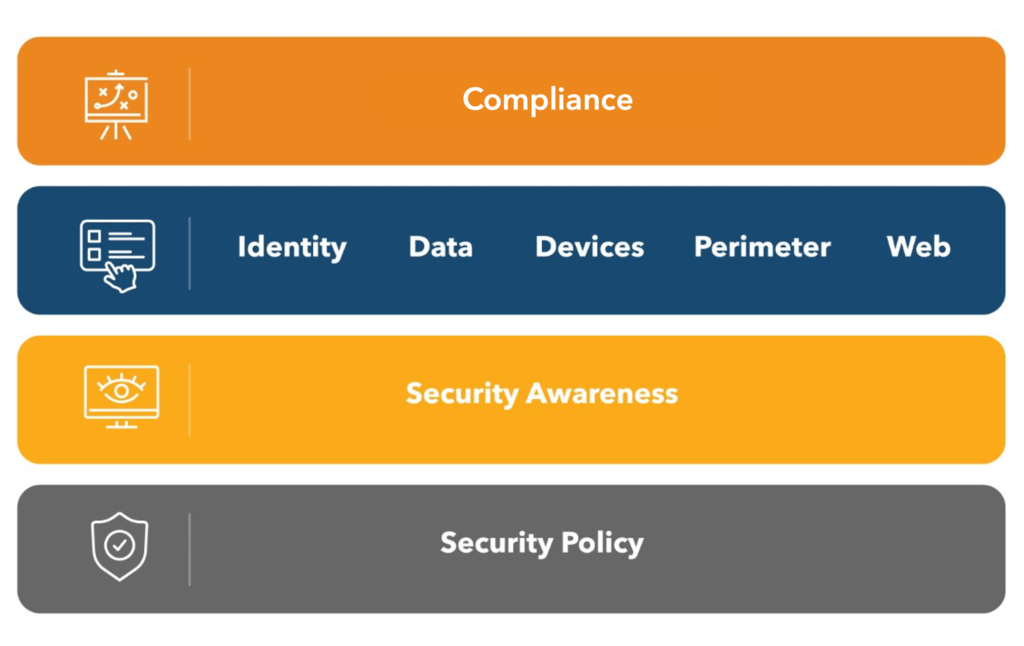
Matthew Eshleman: Yeah, again, I think the main takeaway, right, is that while it’s really easy to think, oh, we’re going to buy this tool and solve this problem, organizations really need to start with a policy that gives you the framework to talk about what you’re going to do and how you’re going to do it. And then you can build on top of that.
The other big layer there is security awareness, right? We want to engage our staff and train them. Tools alone are not going to save us, especially because it’s still technology; it’s still not perfect. And so having an engaged and trained staff is a really important step in providing security for your organization.
And then, yes, there’s lots of tools; they’re great. And then that top layer of compliance really caps it off and maybe informs some of those lower layers as well. It often will give you a set of defined requirements or controls that you need to meet, or ways you need to report information, and provide some checks on those lower three levels.
Carolyn Woodard: Yeah, and if you don’t know what all of those tools are in that dark blue line there with the technology tools, they’re all in the Playbook. So download the Playbook.
But we really want to emphasize: a lot of people are like, well, if I just do those tools, I’ll be safe. And it’s like, there are these four layers. There are three other layers besides the tech tools that you really need to protect your organization that you care about.
Our approach in the Playbook also recognizes this environment: small to mid-sized nonprofit organizations have other constraints on them. In the Playbook, we created three levels of cybersecurity goals and practices. And as I said, every nonprofit should strive to achieve those foundational must-haves, that lower level there.

But this graphic is a little bit deceptive, because we don’t think proactive is quote unquote better than the other layers. Most nonprofits are going to be great at the foundational level. A few are going to need some other levels, probably only in some areas. You could be foundational in everything, and then just due to the nature of what your nonprofit does, you might want to have something that’s optimized or proactive in one area or another.
So it really depends on the nature of your organization, the countries you’re working in, those sorts of things that you probably already know about cybersecurity. We do believe that all nonprofits need to get to that foundational level of security, and that’s the first and largest segment of the ebook.
And it’s covered in our new basics download, which just walks through that foundational level without any of the other options. But of course, like I said, you can always refer to the full Playbook if you have any questions.
And then I just want to mention we have tons of free cybersecurity resources on our website, communityit.com. There’s a cybersecurity library where you can look for those things.
And then just quickly, I’m going to go through costs, because we do get a lot of questions about how much cybersecurity costs or should cost, and how much a nonprofit should spend on their cybersecurity to be safe enough.
Unfortunately, it really depends on your situation and what you need, but most of the foundational tools and time and energy are actually in the lower range of those costs and very doable for nonprofits, even very small ones. Some of the technical tools at that foundational level, you might need a tech savvy person to help you with, mostly because you need someone in that administrator role implementing some of the security tools on the back end, monitoring them for their alerts and reports and that sort of thing.
I think the opposite is also kind of true for most nonprofits. They don’t need most of the most expensive tools. If you don’t know if you need an expensive tool, you probably don’t. So put another way, cybersecurity vendors have a lot of lingo, and a lot of them use fear to try and talk you into some big fancy test. If you haven’t done a basic assessment, there’s no need to do those higher, more expensive tests, because they’re only going to show you what an assessment would have told you anyway. So just keep that in mind as you’re looking through cybersecurity tools.
How Much Attention Does IT Security Get?
But with that, we’re going to go on and talk about the foundational level, and I’m going to do our next poll with you all.
So this poll is: how much attention does IT security get at your nonprofit organization?
First option is too much; it makes it hard to do our jobs. We have to change our passwords. It used to be in the old days, it’s like every week you’re like, God, change your password again. Number two option is just right: my organization takes security seriously and our actions show it. Which, yay, if that’s you, yay. Number three is not enough: we do say it’s important, but I worry we have holes in our approach. That’s what the Playbook is for, and the cybersecurity basics. Number four is none, and that scares me. I’m guessing from our original poll that we’re not going to get a lot of nones, but if that’s you, this is a no judgment area. Go ahead and let it out, because you can be scared. It’s October. And then the fifth one is not applicable, so it’s not something that you guys do. All right.
Matthew Eshleman: I was pleased to see just right: about a third of respondents say they’ve got a really good balance. And so I think that’s positive, good to see. And then the other two-thirds say not enough: we say it’s important, but I worry we have holes in our approach.
So I think it’s a good snapshot point in time, and I must say I’m encouraged to see that organizations seem to be finding that balance in a notable proportion. And then I would certainly echo that we see the majority of organizations say it’s important, but maybe haven’t quite made that investment yet as an organization.
Carolyn Woodard: Or you can just be worried about it. It’s like with cybersecurity, there’s always more that you can do. So hopefully these foundations are going to help you get a little bit more confidence that you’re covering all your bases.
All right, so just giving you that link again to the Foundational Cybersecurity Basics new download that we have. We’re really proud of this booklet. And then Matt, we’re going to move into this checklist that is included in this booklet. It goes through these different areas and then you get this checklist at the end. So can you talk a little bit about that?
The Foundational Checklist: Ownership, MFA, and Stopping Phishing
Matthew Eshleman: Yes. So thanks for putting this up here. I really appreciate the fact that you were thinking about how to present this information, and pulling out that checklist for organizations that are just getting started. And I do think cybersecurity is one of those areas where you really do need to cover your bases, and having that good foundation to build on is very important. And so getting the basics right is absolutely critical.
So you’ll notice that first recommendation here on the list, own it, is not technical at all. It’s just talking about accountability. At Community IT, we believe that organizations cannot outsource their risk, which means that someone at your organization needs to take responsibility for cybersecurity, right? You cannot send that out to your MSP or whatever.
A large part of the response and controls you can outsource, right? You need somebody with capacity to manage and monitor and report and analyze and do all those things. But at the end of the day, someone at your organization needs to have that role clearly assigned to them, to somebody on staff, to make those fundamental decisions.
And it’s a great idea to leverage external partners for the monitoring and the operation, right? It’s a really focused skill set that’s required for monitoring everything and deploying things and all of that configuration. But you can’t outsource the ownership of risk for the organization. So, going through the checklist: all right, we’ve got somebody in our organization, and it’s really clear that they own cybersecurity.
Then the next thing we want to make sure is that MFA is enabled for everybody. Maybe that is moot; we’ve been talking about this. We’ve been doing our Cybersecurity Playbook for years and years and years, and MFA, I think, has been in there every single year as a recommendation. We’ve now evolved that recommendation to really move out into passkeys, to help provide some more phish-resistant capability to combat against the most common types of cyber attacks.
We’re seeing vendors make moves in this area. I think Salesforce made a big move, right? Moving from, hey, you need to have one-time passcodes, to now requiring and enforcing passkeys for everybody. And so the vendors themselves are taking more responsibility for enabling that cybersecurity by default.
Microsoft themselves will be dropping support for voice and SMS multi-factor authentication in February of 2027. So again, if you are an Office 365 customer and you’re still getting text messages or a call, know that Microsoft is going to stop allowing that as a method. I mean, literally the service is not going to work anymore. And so you’ll need to move to a more secure method of multi-factor authentication.
And what I would say is, just take this as an opportunity to move into what we call passkeys, or phish-resistant MFA, as a way to really protect your digital accounts from those outside threat actors.
Once you get MFA in place, taking a look at using a password manager is a great option. We talk about maybe more sophisticated solutions like single sign-on for larger organizations, or organizations that maybe have more resources, but that can be complicated and have some licensing implications. For organizations just starting out, getting a password manager for all staff is a great start.
I’ll say, unfortunately, we still find lots of password spreadsheets in place at organizations. So do yourself a favor: evaluate some password managers out there that have that team functionality, get a license, assign it to everybody in your organization so that you can manage passwords and make sure that you have unique, complex passwords for each site that you access, protect it with MFA, and you really raise the bar for your security protection because of that.
Moving into security awareness training, or phishing awareness training, here. We know from the data that we see, the Verizon security report, their DBIR report, implicated staff manipulation in a majority of breaches. I think it was over 60% of breaches that were reported to them that came through user error, user manipulation, that kind of thing. And what we find is that regular security awareness training helps to build that culture of security, which is key to minimizing your risk.
You want to give staff the tools so that they can correctly identify whenever something doesn’t quite seem right, to have some technical tools to identify links, to evaluate different scenarios, so that they feel confident in responding to those situations when they get into them.
We also want to make sure that as part of that training, staff feel confident or comfortable reporting it. They know where to go, they know how to report that information, and they don’t feel bad and just try to ignore it or hide it. So we want to build that culture of security and openness where people share things that are happening to them.
And I’m really encouraged when I’m talking to different organizations. I know a lot of folks will mention their Teams chat or their Slack, like, hey, I got a really weird message and it looked like this, right? Just to give the heads up that they saw something strange, and they want to share what it looked like so that other people are aware and can avoid it.
And then the final piece, in terms of talking about avoiding it, is getting really good third-party spam filtering in place. For us, because we work with all nonprofits and we know that price is important, right, we don’t mandate that, but we have it available as an add-on. And so through some of those metrics, we can get some data comparing the organizations that have third-party spam filtering and those that don’t.
We can see that the third-party security tools are reducing the phishing volume, right? Those messages that are trying to get you to click on something, to open up an attachment, to maybe copy and paste something into your command prompt: the tools are dropping the volume of those phishing emails by up to 80%.
So technology isn’t perfect, but it can really help to reduce the biggest source of risk to an organization, which is malicious emails, right? At the end of the day, that is a very common attack vector, and they do it because it works. So if you can get that third-party spam filtering service and reduce the amount of junk that your staff are getting, that’s a huge help. We know that Microsoft and Google have some built-in tools, but we find this is one of those things where it is really worth paying extra.
Q&A: Password Managers and Emails Landing in Spam
Carolyn Woodard: There’s a couple of questions before you move on to closing the gaps. One is if you have any recommendations for good password management tools, specifically for legal organizations, but I’m wondering if you just… are there any that are better than the others? I know that there’s several that work really well.
Matthew Eshleman: Yeah, so I would say the ones that we see most often would be Keeper (looks like that was a recommendation); Dashlane, I think they have some nonprofit discounting, so that can be a compelling offering; and 1Password.
In terms of which one is best, the answer again is not really that one is technically superior to another. It’s which one is your organization going to use and adopt? And so I would really encourage organizations to take advantage of some of those free trials, set three different systems up side by side, explore, use them, figure out which one works best for your organization, and go with that one, right? If you have a password manager but nobody uses it, that doesn’t really do you much good.
And so having a tool that you feel comfortable with, that makes sense to you, that you can easily use and administer, that’s the one you want to go with. And there are lots of good options out there.
Carolyn Woodard: Have the person that keeps their passwords in the spreadsheet be on that team that’s evaluating which password keeper you’re going to use, because they are the ones that are going to need to use it.
All right, second question. This person says, I had an issue with a client where my emails to them kept getting dropped into their spam or junk folders, even though they attempted to flag me as okay as a sender.
So is there anything you can do on your end about false positives on spam filtering?
Matthew Eshleman: We could probably have a whole webinar just on that.
But I will say there’s a couple of really key acronyms to think about. I know we’re trying to stay away from a lot of that, but make sure that your email is compliant or up to date with what’s called SPF, which is sender policy framework. That’s: hey, here’s where emails are supposed to come from for our domain. Make sure that’s correct.
And that is combined with DMARC, which basically says, hey, if you get an email and it says it’s from this domain but it’s not on this list, reject it, right? That’s more about protecting your domain from spoofing.
And then DKIM goes along with the other two. It signs your message to say yes, this message did indeed come from the domain that it says it did. So make sure that those things are in place, and you can use some web tools like MXToolbox to do some searching. It can be a little bit mystifying sometimes, right? Sometimes your domain, or maybe a link in your signature, will get flagged on some spam engine, and it just takes a while to figure that out.
So making sure those three records are in place and accurate usually solves most of the problems with having your mail redirected to junk.
Carolyn Woodard: And we did a podcast a little while ago on that, so I shared that link here and it’ll be in the transcript as well. It just talks a lot more about what DMARC and DKIM are.
Matthew Eshleman: Perfect.
Closing the Gaps: Updates, Backups, Policies, and Insurance
Carolyn Woodard: All right, so closing the gaps, the rest of the checklist.
Matthew Eshleman: Yeah, so continuing our recommendations and basic controls: you may have noticed a much more frequent cadence for patching and updates this year. And I would say that is 100% tied to the explosion in the use of AI to find and exploit software vulnerabilities. All the vendors are scrambling to react, right? They’re scanning their own code for vulnerabilities, stuff is getting reported. It’s just kind of a, I don’t know, free-for-all jailbreak, right? There’s just lots of stuff being discovered, and so vendors are pushing updates really frequently to deal with and keep up with the flood of that.
So we say reboot your computer monthly; maybe you need to reboot it weekly, right? It sounds kind of silly, but checking to make sure your software is up to date and rebooting your computer regularly is a really good security practice. So make sure you’re doing that on the regular, and don’t ignore the updates, because if there’s a patch released, it’s usually because there was some exploit that was identified.
The other note here: antivirus, anti-malware, managed and maintained. Again, we have really seen a big spike in the amount of malicious activity being detected on endpoints. And so making sure that you have good tools in place, that they’re active and they’re in use and they’re configured and they’re updated, can help provide that extra layer of protection. So just make sure that you’ve got something in place and it’s up to date.
And then the final piece is around resiliency, and being able to recover if and when you do have some sort of data breach or data loss. And so making sure that you have a good third-party backup tool in place is key to recovery, whenever that data maybe has been lost or corrupted.
I will say Google and Microsoft both provide some basic capabilities in terms of a trash can, or you could recover some data, but that is limited, right, from a time perspective. They maybe only have 30 days’ worth of retention in those situations. There could also be times where, the way data is deleted, it doesn’t show up in those places.
So having a third-party backup in another system that you can control and manage is key to being able to recover data in the event that it’s lost or stolen. And I would also probably expand this definition, right? We often think of Google and Microsoft as the big ones because we’re primarily focused on IT and operations, but that should also extend to your website, your CRM system, your fundraising system, your finance and accounting, right? All of these applications.
We often think, hey, it’s in the cloud, it’s all taken care of. That maybe means you don’t have to maintain the hardware underneath of it, but it is good to clarify with your vendors: hey, what happens if a malicious actor gets in and corrupts a bunch of our data or deletes a bunch of stuff? How could we get that back?
You don’t need to know the technical details of how all of it works, but having those clear scenarios to say, how would we respond in this case, or how would we respond in this other scenario, can be good to just confirm that things are going to work as you expect when you run into that scenario.
Cybersecurity Basic Policies and Accountability
Carolyn Woodard: All right. And then we have a few more things on the checklist, and then we’ll be able to get to some recent threats.
Matthew Eshleman: Yes, great. We’ve talked about it a lot: policies are important. I think a lot of these were on our update two years ago, and now the addition, I would say, is the AI acceptable use policy.
So I think policies are a great way to start because they help an organization distill and define what they’re going to do and how it’s going to get done. And putting things down in writing means that you’ll have some discussion around maybe some assumptions that people have, and conflict areas that, if you’re not talking about it, you can kind of ignore.
And so things that often come up in organizations, that this policy exercise is good to clarify, are things like the use of personal devices to access work data. Unless you’ve done something proactive, you can’t necessarily wipe data from personal devices if they are lost or stolen, right? Interns, contractors, a lot of remote staff: you don’t have control of the devices themselves. And so if a device is lost or stolen, it’s really important that you understand what controls and parameters you have in place to protect data that may be on those devices.
Understanding where your data is as an organization: what are those official systems of record, who maintains them, who supports them, what data is there, how is it archived or deleted? All of those questions are good to clarify. Again, with all the proliferation of SaaS applications, it’s super easy for somebody to just sign up for an app, put a bunch of data in it, and start using it, right? And so you have a lot of ungoverned data out there. So being clear about this is our official system of record, here’s how we’re using it, here’s who has access: those are good conversations to have to clarify how all the workflows are supposed to happen.
And with AI, again, we’ve got great templates. It’s something that I think you need to work on and be really flexible on, but don’t be overly prescriptive, as this is changing super rapidly.
So in our templates, we like to start with what’s approved and then iterate regularly. Like, here’s the things we’re working on now; let’s give a use this, not that framework, and make sure that it’s updated regularly. AI is a tool. It’s a tool that a lot of organizations are using. It’s also a tool that you don’t have to use, right? There seems to be the feeling that, hey, everybody else is doing it, but you can also take a stand to say, hey, we’re not going to use it, and make that clear to staff as well.
Like I said, in the absence of really good communication and maybe technology controls to prevent it, staff are 100% using AI tools. It’s something that we can see. And it’s good to provide that clarity to organizations: that these things are in use and they’re really widespread.
So you do need an AI policy, even if your policy is that you don’t use AI at your organization.
We’ve talked a little bit already about the cyber liability insurance conversation, right? If you don’t have that protection in place already, I would start with your existing broker. It can seem like a big new expense, but it’s a pretty common policy. You probably want to bundle it with other things you already have, right? And so having that protection in place gives you some guardrails in case your organization is a victim of wire fraud or something really significant that impacts your operations, or protects you in the event that maybe you have a data leak and you need to provide reporting on all the people whose data was disclosed.
Carolyn Woodard: And then that compliance piece.
Matthew Eshleman: Yep. So I think closing the compliance loop is making sure that you actually have a plan, right? So that person, or maybe the team, that we identified at the start as the owner has milestones that are built into their performance expectations and, maybe more importantly, the time and support to actually do that work.
I think in nonprofit organizations, it just seems like there’s always more work to do and not enough time allocated for it. But this is something that needs to have formal recognition: this is a responsibility that this person has, and we’re also going to give them the time that they need to carry out that work.
Carolyn Woodard: Yeah, I think that’s how people or organizations get behind: it’s just something else put on somebody’s plate, and they didn’t make any room on the table for that plate to be on there. So make sure that you’re supporting that person.
I’m just going to show this example very quickly. It’s an example of an IT roadmap that you might make for this person, or the person might make for the organization, of what you’re going to do and how urgent it is. You can put extra columns on here for who’s going to do it, how much it’s going to cost, when it’s going to be done by, all of those pieces. And that is just a great way to report back on your progress.
So, like I said, cybersecurity can feel like you’re always running in place, like there’s always more stuff to do. So for a lot of organizations, having some kind of checklist where you’re like, look at what you accomplished. You didn’t have MFA a couple of months ago, and now everybody has it. So just being able to check those off is really important. And I have a link here that I can share with you about creating an IT roadmap, which could include security. You can do it just for security.
I want to move a little bit quickly through some of these other levels that are in the Playbook. If you’ve downloaded the Playbook, you’ll see these other levels, but again, do a risk assessment first. Cybersecurity is a journey, not a destination. Developing that roadmap and being intentional about improving your cybersecurity will help reduce your risk. So it is very worth putting the effort into.
New Twists on Old Cybersecurity Attacks
Carolyn Woodard: And I went through that quickly because I wanted to be able to get you to weigh in on this, Matt. So, some new twists on some old cybersecurity attacks.
Matthew Eshleman: As we talked about, phishing and account compromise and user-targeted things continue to be the main point of attack for scammers in 2026.
And viruses are back; they’re worse than ever. There are lots of really sophisticated ways now that adversaries are able to pull on those levers to get people to click on the link, to provide that MFA code, to kind of do the work for them, so to speak.
And so we certainly see that a lot. We’ve had a couple of recent account compromises. In both cases they were organizations that didn’t have third-party spam filtering, and they got some very convincing messages that they clicked on, and then those got forwarded around, and it just ends up being a real mess to try to clean up. So again, the sophisticated email attacks continue to be very effective for these threat actors.
I think the new thing that we are seeing is that phishing doesn’t always come as that link. We’re starting to see stuff like calendar invites come in; they kind of land and go around a lot of the spam filtering tools. Things are often shared as a document, and then they have the instructions in the document that conveniently tell you how to copy and paste maybe a code that’s going to allow somebody else to access your system.
So be cautious of how you’re receiving those, even if it’s from somebody that you know, because it is likely that their account could have been compromised and then used to target and pivot to other email contacts that are in that organization’s domain.
Like I said, wire fraud continues to be the big one, right? At the end of the day, the amount of financial fraud that goes on is really the main driver, and that continues to increase year over year.
And that, I think, gets carried out through a number of different ways, from phone calls to updating invoices to payment change requests. All these different methods are kind of new spins on old techniques, fundamentally designed to get access to banking information that they are not supposed to have.
And then we have the last item here: attacker-in-the-middle attacks continue. That is where you get a link, it looks realistic, it even looks like your Office 365 or Google sign-in page, but it’s going through an attacker’s framework, and so they’re actually able to steal your session, right? They’re not taking your password, so to speak, but they effectively have what they need to appear as you.
And so that’s why we are making that push to switch to phish-resistant passkeys or security keys, as a way to mitigate that risk.
New Cybersecurity Attacks on Nonprofits
On the next slide, continuing on, some of these other attacks that we are seeing are job posting and HR scams that impersonate your organization. We’re starting to see more around deepfakes, usually trying to get something out of your organization, like money or access. But many nonprofit organizations are also concerned about deepfakes that would cause reputational harm by misrepresenting policies or staff members’ views.
So there’s lots of things to be concerned about in terms of protecting your organization’s identity and the trust that you’ve built up over time.
And so these are just new technology tools that are available, and organizations are going to need to find ways and strategies to verify and validate and be able to provide assurance that the content that you’re putting out is, in fact, you.
The other piece I did want to highlight here is that a lot of this is technology delivered over the internet, right? Email, web attacks, so on and so forth.
But we’ve also seen what maybe seem like throwback attacks around wire fraud that’s initiated over the phone first. Maybe that ties into some of these deepfake capabilities, to help people create a more polished conversational tone. And so we have seen, or have heard reports, where the bank, so to speak, calls in to verify some information, and they’re able to convince or get that information from people on staff.
And so again, there are some technology tools that you can have in place to maybe prevent some attacks, there are some training tools, there are some process tools. And so viewing this from a holistic perspective, protecting your organization is going to involve more than just buying the spam filter, right? It’s also going to involve talking about how we make changes to banking information. That’s a conversation you need to have internally, and it’s a conversation to have with your financial institution as well.
Carolyn Woodard: I want to make sure we talk about that last bullet point, because I know we have legal people attending, and I had never heard of this: DMCA copyright infringement notices that are fake. So what is that?
Matthew Eshleman: Yeah, so it’s a technique that actually I think has been in use for a while. The Digital Millennium Copyright Act is a real piece of legislation that’s designed to protect people with digital copyrights, to say, hey, you can’t just use my audio or images or whatever without attribution.
But it can also be used and manipulated to create a realistic, legal-sounding threat that again is just trying to get you to make a payment to a fraudster because of some vaguely worded legal threat, right?
I think as soon as everybody’s like, oh, the lawyers are involved, I’m getting this legal-sounding message, I need to comply with it… And so again, treat those with caution. It’s not to say you just want to delete everything because it’s 100% a scam; that’s not true, right? There could be legitimate communication that you’re getting because somebody accidentally didn’t get the correct permissions to use a certain piece of media on a website or an appeal.
So there could be legitimate cases where you receive these takedown notifications, but I’d say it’s primarily used by scammers as a way to worm their way into your organization and put up a dollar amount, right? It’s like, oh well, it’s just cheaper to pay this than to talk to our lawyer about whether we should or not.
Carolyn Woodard: So it’s just amazing what they will come up with. And I mean, using that.
I think one of the things that we teach in cybersecurity awareness is: look at your emotions. Is it trying to appeal to fear or shame or embarrassment, or to doing something quickly with urgency? Just be aware of how you’re reacting to something, and have that trigger you to think, wait, should I be worried about this or not? Are they just trying to get me?
Wrapping Up and Next Month’s Webinar
Carolyn Woodard: So unfortunately we’re kind of running out of time for the Q&A. So what I’m going to propose, Matt, is that we just go over to Reddit after this. If you have more questions, go ahead and join us on Reddit, and Matt will be there to answer questions.
I wanted to make sure to go back over the learning objectives we had for today, which were to learn our basic approach to cybersecurity and understand the new threats in the age of AI; we’ve talked about many of them.
And I think there’s kind of a theme of: if AI can make it convincing, a scammer is going to do that. So there are going to be brand new things. Like doing those patches right away, keeping an eye out for stories that are coming out about new scams… It’s changing so quickly, so keep an eye on that.
Learn the foundational level that we recommend: that is in our basics download, and it’s also in the Playbook. And then the takeaways are those first steps and best practices in managing cybersecurity at your nonprofit. We shared that checklist that you can use; it is in the basics download. And here are those two links again to the URLs.
Before you go, I want to make sure to invite you back next month for our final webinar of 2026, and this is just a little topic, a little side note: should your nonprofit use AI? This is a question we get asked a lot. It’s out there in the nonprofit environment a lot.
We’re going to do a different format with this webinar to talk about it. I’m going to be joined by Steve Longenecker, who’s our director of IT consulting, and Nuradeen Aboki, who’s our senior consultant. Both of them have worked with a lot of clients on AI and AI implementation and readiness, but they’ve also worked with clients that don’t want to do AI.
So we’re going to answer five or six common questions that nonprofits have about AI, starting with that existential one, moving on to readiness, security, impact. The three of us have very different experiences with AI tools and with the ways our clients use them. We don’t always agree.
So I’m really looking forward to this conversation. It’s going to be at 3 p.m. Eastern, noon Pacific, on Wednesday, November 18th. Please join us, and if you submit your questions at registration, we might answer one of them on our panel. You can register now on our website at communityit.com, and I’m putting that in the chat as well. So go ahead and register for that.
Don’t forget, as you exit the webinar today, to take our short survey. One lucky winner chosen at random receives a $25 gift certificate for helping us learn how we’re doing. Join us over on Reddit; Matt’s going to answer some questions over there.
Matt, I want to thank you so much for your time today and for all your work on helping update this Playbook and develop the basics download, so that our community really has what they need to get started. Cybersecurity can be so lingo-ridden and emotional; you want to put it in the drawer and just not worry about it.
So I really appreciate your time and helping inform us and help us educate ourselves. I want to appreciate everyone on the webinar today. Your gift of an hour with us is something we don’t take lightly. You’re in the right place: you’re worried about cybersecurity and getting better at it, and getting better at it is something that we really believe all of us can do. It is not beyond you. So go ahead and download these free guides, and Matt, thank you again so much for your time today.
Matthew Eshleman: Yes, thank you, Carolyn. And I’ll just highlight my meeting information; it was posted there again. There’s lots of stuff that you can read and try to understand, but I’m also happy to have a short conversation and just clarify some of those questions that come up. It’s really important for us to help build that foundational knowledge around protecting your organization’s data from all the threats that are out there.
Carolyn Woodard: Yeah, we just want the nonprofit sector to be doing this as well as we can. So thank you again, and we will see you over there on Reddit.
As advocates for using technology to work smarter, we’re practicing what we recommend. This transcript was drafted with the assistance of AI, and is not a verbatim transcript. The content was edited for clarity, and was reviewed, edited, and finalized by a human editor to ensure accuracy and relevance.
Photo by Christina @ wocintechchat.com M on Unsplash